
You sell the same blue t-shirt on Shopify, Amazon, eBay, and Etsy. On Shopify it’s BLU-TSHIRT-M. On Amazon it’s TS-Blue-Medium. On eBay? Just shirt123. Sound familiar?
This little mess is quietly draining thousands of dollars every month from sellers like you — through oversells, refunds, suppressed listings, and angry reviews. The good news: you don’t need expensive software or a 50-page playbook to fix it. You need one simple SKU system that works the same way on every channel.
This guide gives you everything: the naming formula, the mapping table, the bundle math, the audit checklist, and the real-world workflows. No fluff, no jargon — just what works.
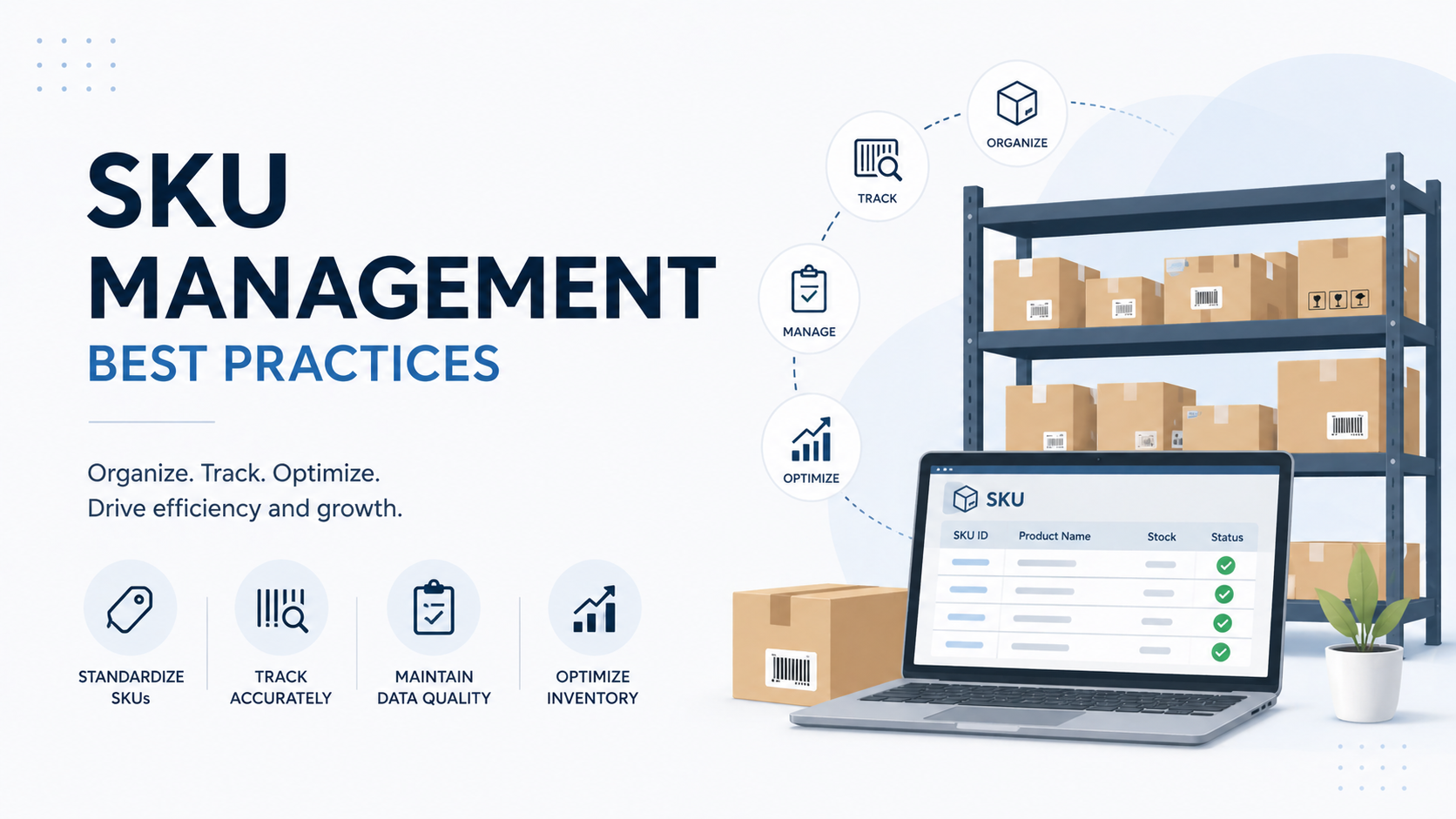
Quick Answer: The best SKU management practice for multi-channel sellers is to use one master SKU (format:
BRAND-CATEGORY-PRODUCT-VARIANT-SIZE) on every channel, maintain a master mapping table linking it to each platform’s native ID (Amazon ASIN, eBay Item Number, Shopify Variant ID), never reuse retired SKUs, and audit the catalog every 90 days. Consistency beats complexity, every single time.
What Is a SKU? (And Why Multi-Channel Sellers Get Hurt the Most)
A SKU (Stock Keeping Unit) is just a code you give each product to track it. Think of it as a name tag for every item in your store. Pronounced “skew.”
If you sell on one website, messy SKUs are annoying. If you sell on multiple channels, messy SKUs become dangerous. Here’s what breaks the moment your SKUs get out of sync:
- You sell stock you don’t actually have (oversells)
- Inventory sync between platforms goes wrong
- Reports show wrong numbers
- Reorders get delayed or duplicated
- Returns and refunds turn into a nightmare
- Amazon or Walmart suspend listings for stock errors
- Your team wastes hours every week “fixing” mismatches
A 2025 Conjura study found that around 62% of e-commerce SKUs are unprofitable, and disorganized SKU systems are a leading cause. Brightpearl reports that inventory and SKU mistakes are one of the top three reasons multi-channel sellers lose money each month.
Translation: fixing your SKU system is one of the highest-ROI things you can do this year.
SKU vs UPC vs ASIN — What’s the Difference?
People mix these up all the time. Here’s the simple version:
- SKU — your internal code. You create it. You control it.
- UPC / EAN — the barcode on the product. Issued by GS1. Universal across the world.
- ASIN — Amazon’s product code. Amazon assigns it. You don’t control it.
- eBay Item Number — A number eBay gives every listing. Auto-generated.
- Shopify Variant ID — A number Shopify creates for every variant. Auto-generated.
Your SKU is the only one you control on every platform. That’s why getting it right matters so much.
The Golden Rule: One SKU. Every Channel. No Exceptions.
This is the rule most sellers break. And it’s the single biggest fix you can make today.
Your SKU on Shopify, Amazon, eBay, Walmart, TikTok Shop — they should all match exactly. Same letters. Same numbers. Same dashes. Same case (use UPPERCASE everywhere).
Why it matters:
- Inventory sync tools work only when SKUs match exactly
- You can pull combined sales reports without doing math gymnastics
- New team members understand your system in minutes
- Switching from Shopify → BigCommerce (or any tool change) becomes painless
- You stop overselling because every channel “speaks the same language”
If you already use different SKUs on each channel, fix it now. The longer you wait, the bigger the cleanup. Every month you delay, the mess grows.
How to Build a Master SKU Format (Copy This)
Before you list a single new product, decide on ONE format that works everywhere. A good SKU tells you something useful at a glance — without opening the product page.
The Formula That Works for Every Multi-Channel Seller
[BRAND]-[CATEGORY]-[PRODUCT]-[VARIANT]-[SIZE]

Examples:
  NK-APP-TSHIRT-BLU-M    (Nike, Apparel, T-Shirt, Blue, Medium)
  NK-APP-TSHIRT-RED-XL   (Nike, Apparel, T-Shirt, Red, XL)
  AP-ELEC-CHARGER-USBC   (Apple, Electronics, Charger, USB-C)
  YK-HOME-CANDLE-VAN-12OZ (Yankee, Home, Candle, Vanilla, 12oz)
  AD-OUTD-SHOE-BLK-9     (Adidas, Outdoor, Shoe, Black, Size 9)
The 7 Rules You Must Follow
- Use ALL UPPERCASE. Some sync tools are case-sensitive.
nk-app-tshirt-blu-mandNK-APP-TSHIRT-BLU-Mare treated as two different products. Force uppercase always. - Use hyphens (-) only as separators. No spaces (break CSV files). No underscores (look like hyphens but aren’t). No slashes (break URLs). No periods (conflict with file extensions).
- Keep total length under 40 characters. Amazon caps at 40, eBay at 50, Shopify at 255. Stay under 40 to be safe everywhere.
- Avoid look-alike characters. No O vs 0, no I vs 1, no S vs 5. These cause picking errors in warehouses.
- Letters and numbers only. No symbols. No
&,%,/,', or trailing spaces. - Same abbreviations every time. Always
RED, neverRorRed-1. AlwaysM, neverMED. Publish a code sheet for your team. - Don’t put product names inside the SKU. Use generic codes like
TSHIRT, notCLASSICVNECK. Product names change. SKUs shouldn’t.
SKU Anti-Patterns (Bad Examples to Avoid)
| Bad SKU | Problem |
|---|---|
Black T-Shirt Medium | Spaces break CSV imports |
NK_APP_TSHIRT_BLU_M | Underscores look like hyphens at a glance |
001 | Sequential numbers carry zero info |
NK-APP-CLASSICVNECK-BLU-M | Product name embedded — breaks if name changes |
nk-app-tshirt-blu-m | Lowercase causes case-sensitivity sync bugs |
NK/APP/TSHIRT/BLU/M | Slashes break URLs and APIs |
NK-APP-TSHIRT-BLUE-MEDIUM | Full words use too many characters at scale |
Once you set this format, do not change it. Future you will thank you.
The SKU Mapping Table: The Most Important Spreadsheet in Your Business
Here’s the part most “SKU best practices” articles skip — but it’s the difference between sellers who scale and sellers who burn out.
Every channel uses a different ID system. You can’t change that. But you can build one master table that links them all to your single internal SKU. This is your SKU mapping table.
What a Real Mapping Table Looks Like
| Field | Example Value | Who Assigns It |
|---|---|---|
| Internal SKU | NK-APP-TSHIRT-BLU-M | You (your master) |
| UPC / EAN | 012345678901 | GS1 (your barcode) |
| Amazon ASIN | B0EXAMPLE01 | Amazon (auto) |
| Amazon Seller SKU | NK-APP-TSHIRT-BLU-M | You (use your internal SKU here) |
| eBay Item Number | 3956284710 | eBay (auto on listing) |
| Shopify Variant ID | 44928371650 | Shopify (auto) |
| Walmart Item ID | 829461053 | Walmart (auto) |
| Supplier SKU | AT-BLK-TEE-M | Your supplier |
That’s 8 identifiers for ONE product on 4 channels. With 500 products, you’re managing 4,000+ relationships. With 2,000 products? Over 16,000.
Without a mapping table, your team will burn hours every week trying to figure out “which Amazon listing matches our Shopify product.” With one, sync runs automatically and your stress drops 80%. If your catalog management is already messy across channels, this is the first thing to fix.
How Sync Failures Happen (Real-World Examples)
- Missing mapping: You added a new product to Shopify but forgot to enter the eBay Item Number. Inventory pushes to Amazon and Shopify, silently skips eBay. Three days later — oversold on eBay.
- Stale mapping: Amazon suppressed an old listing. You created a new one with a new ASIN. But your mapping still points to the old ASIN. Stock updates go to a dead listing.
- Duplicate mapping: Two internal SKUs accidentally point to the same Amazon ASIN. Both push stock updates. Inventory ping-pongs between two numbers.
- Format mismatch: Internal SKU is uppercase. Someone entered Amazon Seller SKU in lowercase. Sync system treats them as different products.
Every one of these is preventable with one rule: no listing goes live until its mapping row is 100% complete. Make this a non-negotiable team policy.
Handle Product Variants the Smart Way
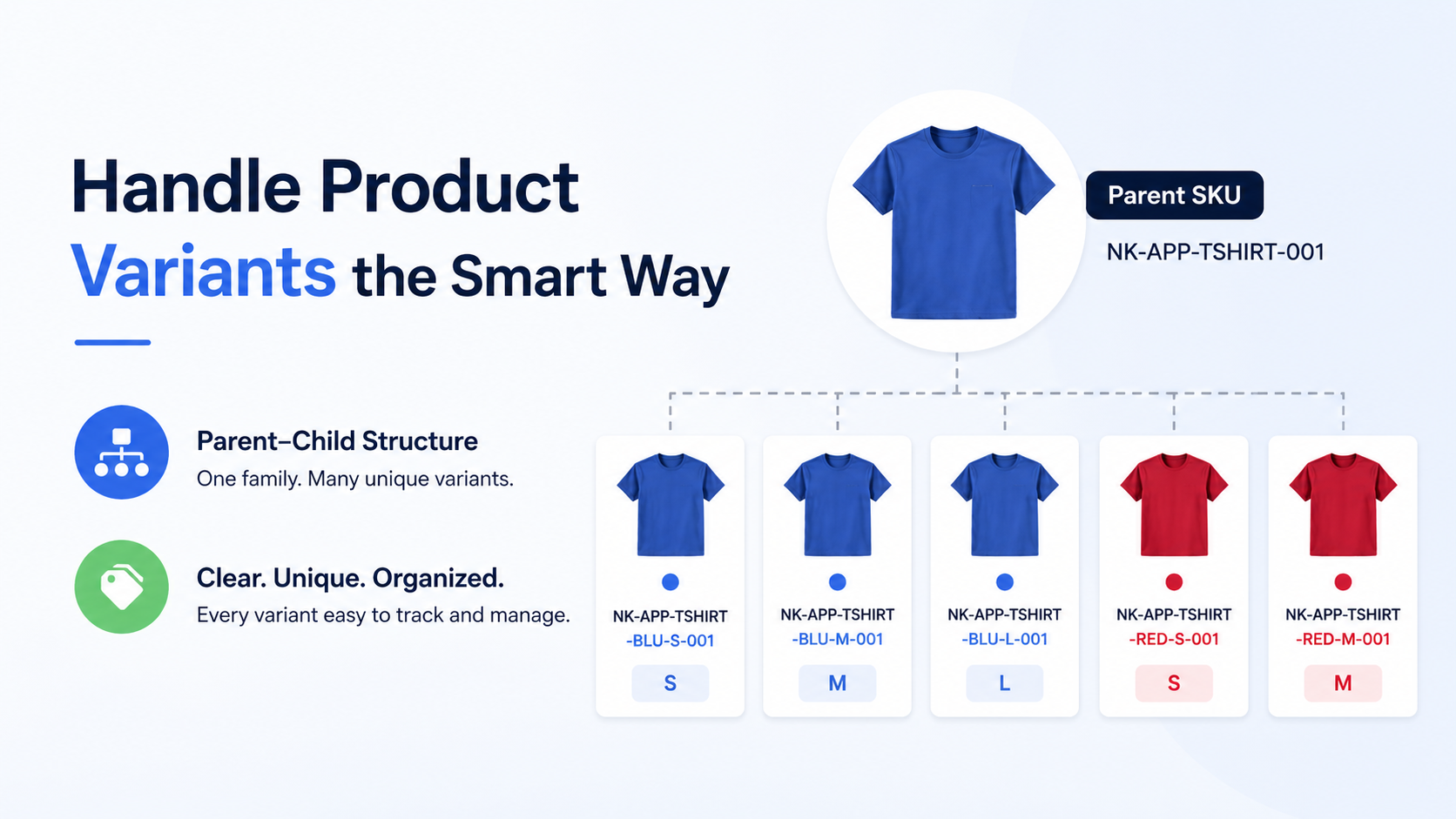
Variants are where most sellers slip up. A red shirt in size small must be clearly different from a red shirt in size large — but they should still belong to the same “family.”
Use a parent–child structure:
- Parent SKU (the main product family):
NK-APP-TSHIRT-001 - Child SKUs (each unique variant):
NK-APP-TSHIRT-BLU-S-001NK-APP-TSHIRT-BLU-M-001NK-APP-TSHIRT-BLU-L-001NK-APP-TSHIRT-RED-S-001NK-APP-TSHIRT-RED-M-001
Watch Out for Variant Explosion
A t-shirt in 6 sizes × 10 colors × 3 fits = 180 SKUs from one product. With 50 base products and similar depth, you’re managing 9,000 SKUs — most of which barely sell.
How to control variant bloat:
- Audit sales by variant every quarter. Find your 80/20.
- Retire variants that sell fewer than 10 units in 90 days.
- Launch new products with proven variant combos only — expand based on data.
- Use pre-order or made-to-order for niche variants. Don’t hold stock.
Bundles & Kits: The #1 Source of Multi-Channel Oversells
Bundles are one of the best growth strategies — and one of the biggest oversell traps. Almost every seller gets this wrong on day one.
The rule: Never track bundle stock as a separate number. Always calculate bundle availability from the components.
How Bundle SKUs Should Work
Bundle SKU: NK-BUNDLE-STARTER

Contains:
  1 × NK-APP-TSHIRT-BLU-M (in stock: 150)
  1 × NK-ACC-CAP-BLK     (in stock: 85)
  1 × NK-ACC-TOTE-NAT    (in stock: 200)

Available bundles = MIN(150, 85, 200) = 85
Bottleneck: the cap

When 1 bundle sells:
  TSHIRT-BLU-M: 150 → 149
  CAP-BLK:       85 → 84
  TOTE-NAT:     200 → 199
  Bundle available: 85 → 84
The Disaster Scenario (Why Separate Bundle Stock Fails)
Imagine you have 85 caps in stock, so 85 bundles available.
- 2:00 PM — A customer buys 10 caps individually on Shopify.
- Your batch sync runs at 3:00 PM. For one full hour, your bundle listing on Amazon still shows 85 available.
- During that hour, a customer orders 80 bundles on Amazon.
- Math: you need 80 caps for bundles + 10 already sold = 90 caps. You only have 85.
- Result: 5 oversold orders, Amazon hit, refunds, angry customers, account health drops.
The fix: real-time component-based bundle calculation. Every modern inventory tool (Cin7, Linnworks, Sumtracker, ShipBob) supports it. Turn it on. Don’t use separate bundle stock counts. Ever.
Bundle Types You’ll Actually Need
- Simple bundle: 1 of each component (Tee + Cap + Tote)
- Quantity bundle: 3-pack of the same item (3 × T-shirt)
- Mixed bundle: 2 × Tee Medium + 2 × Tee Large + 1 × Tote
- Nested bundle: A bundle inside a bundle. Avoid these. They create circular dependencies. Always flatten to component SKUs.
Never Reuse Retired SKUs (This One Hurts)
Here’s a mistake that haunts sellers for years. When a product is discontinued, retire its SKU forever. Don’t recycle it for something new — even if the old item is gone.
Why? Old data tied to that SKU still lives in:
- Your sales reports
- Customer order history
- Returns and refund records
- Amazon ASIN matching system
- Customer reviews
- Supplier purchase history
Reusing a SKU mixes old and new data. Your “2024 sales” for NK-APP-TSHIRT-BLU-M and your “2026 sales” for the same SKU now refer to two completely different physical products. Analytics become useless.
What to do instead:
- Mark the SKU as “inactive” in your master catalog
- If you launch a replacement, add a version suffix:
NK-APP-TSHIRT-BLU-M-V2 - Keep all historical data — never delete it
- Add a “Date Retired” column to track when each SKU was discontinued
Pick the Right Tools (Spreadsheets Will Fail You)
Most sellers start with Google Sheets. That’s fine for the first 50–100 products. After that, manual management breaks down — and oversells start eating your margin.
Tool Recommendations by Catalog Size
| Catalog Size | Recommended Tools | Monthly Cost (Approx.) |
|---|---|---|
| Under 100 SKUs | Google Sheets + Shopify built-in inventory | $0 |
| 100–500 SKUs | Sumtracker, Sellbrite, or Zoho Inventory | $30–$100 |
| 500–2,000 SKUs | Cin7, Linnworks, or Skubana | $300–$800 |
| 2,000+ SKUs | NetSuite, Brightpearl, or full ERP | $1,000+ |
| Any size + outsourced fulfillment | ShipBob (3PL with built-in inventory) | Pay per fulfillment |
The best tool is the one your team will actually use every day. Don’t pay for features you won’t touch. A simple tool used consistently beats a powerful tool that gets ignored.
The 90-Day SKU Audit Checklist
SKU systems drift over time. New team members add products their own way. Old products linger. Channels change. A small mess becomes a big one fast.
Set a recurring calendar reminder every 3 months. Block 2 hours. Run this checklist:
The 7-Step Quarterly Audit
- Find duplicate SKUs. Sort your master catalog by SKU. Look for any duplicates. Resolve immediately.
- Find blank SKUs. Filter for empty SKU fields. Every product must have one.
- Match SKUs across channels. Pull SKU lists from Shopify, Amazon, eBay, etc. Compare. Find mismatches. Fix them.
- Identify dead SKUs. Any SKU with zero sales in 90 days? Flag for review.
- Archive discontinued items. Mark old products inactive. Don’t delete — preserve history.
- Check for naming inconsistencies. Look for old format SKUs that slipped past your standard. Convert them.
- Validate channel mappings. Confirm every Amazon ASIN, eBay Item ID, and Shopify Variant ID still resolves to a live listing.
A 2-hour audit every quarter saves 20+ hours of cleanup later. Skip it once, and the mess compounds.
Real Example: How One Seller Fixed Their SKU Mess in 60 Days
Sarah, a home goods seller from Austin, sold on three platforms (Shopify, Amazon, Etsy) with three different SKU systems. She was overselling around 15 items per week and refunding customers constantly. Her customer service team was drowning in complaints, and her Amazon account health was slipping into the “At Risk” zone.
Here’s exactly what she did one weekend:
- Day 1 (Saturday morning): Built a master spreadsheet with ONE unified SKU format using
BRAND-CATEGORY-PRODUCT-COLOR-SIZE. - Day 1 (Saturday afternoon): Mapped each old SKU on each channel to the new master SKU. 280 products total.
- Day 2 (Sunday): Updated her top 50 best-sellers across all channels with the new SKU.
- Week 1–4: Worked through the rest of her catalog, 30–40 products per week.
- Week 5: Set up Sumtracker to sync all three channels using the new master SKUs.
Results within 60 days:
- ✅ Oversells dropped from 15/week to 0–1/week
- ✅ Customer complaints fell by ~70%
- ✅ Saved roughly 8 hours per week on inventory work
- ✅ Amazon account health bounced back to “Healthy”
- ✅ Revenue went up 12% (because listings stopped getting suppressed)
The fix wasn’t fancy. It was just consistency.
10 Common SKU Mistakes (and How to Avoid Them)
- Using product names as SKUs. Names change. SKUs shouldn’t.
- Making SKUs too long (over 40 characters). Breaks platform limits.
- Skipping SKUs for low-priced items. Every product needs one. No exceptions.
- Letting team members create their own formats. Publish a code sheet. Enforce it.
- Forgetting to back up your master list. One corrupted file = years of damage.
- Tracking bundles as separate stock. Use component-based calculation always.
- Reusing retired SKUs. Permanent retirement. Always.
- Using your supplier’s SKU as your own. When you switch suppliers, you’ll have to update everywhere.
- No mapping table. Without it, sync fails silently and you don’t know until customers complain.
- Skipping audits. Drift is real. Quarterly audits keep your system clean.
Scaling SKU Management: From 100 to 10,000 Products
What you need at 100 SKUs is very different from what you need at 10,000. Use this maturity ladder to figure out where you are and what to add next.
Stage 1: Under 100 SKUs (Manual)
- Master spreadsheet with consistent naming
- Manual sync checks weekly
- Built-in tools from Shopify or your main channel
Stage 2: 100–500 SKUs (Semi-Automated)
- Master catalog in inventory software (Sumtracker, Sellbrite)
- Automated multi-channel sync
- SKU generation template (form or validated spreadsheet)
- Monthly mapping audits
Stage 3: 500–2,000 SKUs (Automated)
- Full OMS like Cin7 or Linnworks
- Bulk import/export with diff preview
- Automated duplicate detection
- Real-time bundle cascade
- Stale mapping alerts
- Quarterly catalog cleanup
Stage 4: 2,000+ SKUs (Enterprise)
- ERP-grade system (NetSuite, Brightpearl)
- Change management workflows for SKU updates
- API-driven catalog management
- Rollback capability for bulk operations
- Orphan detection (SKUs with no active listings)
- Dedicated catalog manager role on the team
The key lesson: don’t over-build at the wrong stage. A $1,000/month tool for 200 SKUs is wasted money. A spreadsheet for 5,000 SKUs is a guaranteed disaster. Match your tools to your scale.
Frequently Asked Questions
What is the best SKU format for multi-channel selling?
The best SKU format is short, structured, and human-readable. The proven formula is BRAND-CATEGORY-PRODUCT-VARIANT-SIZE, for example NK-APP-TSHIRT-BLU-M. Keep it 8–40 characters, use UPPERCASE only, hyphens as separators, and avoid look-alike characters (O/0, I/1).
Should my SKU be the same on Shopify, Amazon, and eBay?
Yes. The same physical product should use the exact same SKU on every channel. This is the single biggest factor in keeping inventory in sync and avoiding oversells. Every modern channel allows you to enter your own SKU.
What is a SKU mapping table and why do I need one?
A SKU mapping table is a master spreadsheet (or database) that links your internal SKU to every platform-specific identifier — Amazon ASIN, eBay Item Number, Shopify Variant ID, Walmart Item ID, UPC, and supplier SKU. You need it because every channel uses a different ID system. Without a mapping table, your sync tools fail silently and you start overselling.
How many SKUs are too many?
There’s no fixed number, but if more than 20–30% of your SKUs haven’t sold in 90 days, your catalog is bloated. Audit and retire slow movers regularly. Quality beats quantity — 100 SKUs that all sell beat 1,000 SKUs where only 50 move.
Can I change my SKU system later?
You can, but it’s painful. You’ll need to update each channel listing, your inventory tool, your accounting software, your fulfillment partner, and your warehouse labels. It’s far easier to set the right format from day one. If you must migrate, do it in stages: top 50 sellers first, then expand.
Do small sellers really need a SKU system?
If you sell on more than one channel — yes, even with 20 products. Multi-channel selling without a master SKU system almost always leads to oversells within the first few months. Better to start clean.
How often should I audit my SKUs?
Every 90 days. Block 2 hours, run the 7-step audit (duplicates, blanks, mismatches, dead SKUs, discontinued items, naming consistency, channel mappings). Quarterly audits prevent 90% of drift problems.
What’s the difference between a SKU and a UPC?
A SKU is your internal code — you create it and control it. A UPC (Universal Product Code) is the external barcode issued by GS1 — it’s universal across the world and required by Amazon, Walmart, and most major retailers. You need both. Your SKU goes in your systems; the UPC goes on the product.
Should I include the supplier’s SKU in my own SKU?
No. Use your own internal SKU and store the supplier SKU as a separate field in your master catalog. Why? When you switch suppliers (and you will), you’d have to update SKUs everywhere. A separate field means you change one column, not your entire system. This is also why a clean supply chain setup matters — your SKU system needs to survive supplier changes without breaking.
What happens if I reuse an old, discontinued SKU?
Your sales data, return records, customer reviews, and Amazon listings all still reference that SKU. Reusing it mixes old and new product data, breaks analytics, and can confuse Amazon’s ASIN matching. Always retire SKUs permanently. If you launch a replacement, use a version suffix like -V2.
Your Next Step (Don’t Skip This)
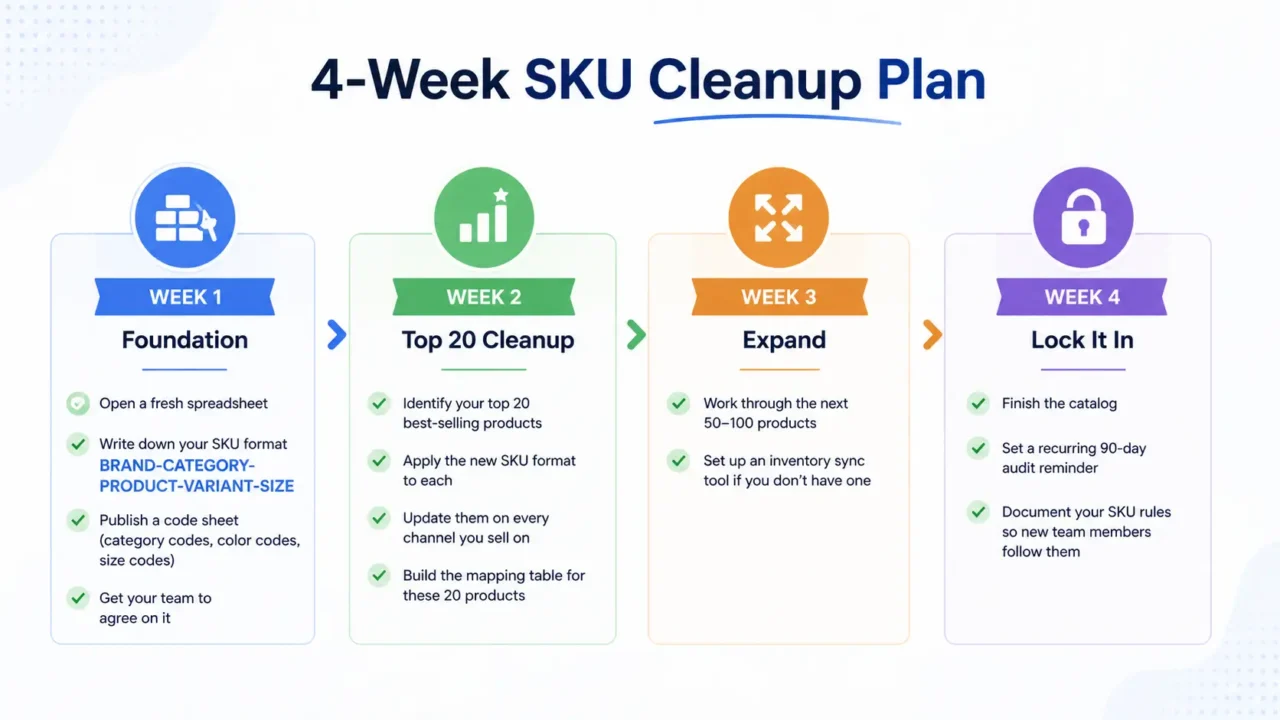
If your SKUs are a mess right now, don’t try to fix everything tonight. Sellers who try to fix everything at once usually quit halfway. Use this 30-day plan instead:
Week 1: Foundation
- Open a fresh spreadsheet
- Write down your SKU format using the
BRAND-CATEGORY-PRODUCT-VARIANT-SIZEformula - Publish a code sheet (category codes, color codes, size codes)
- Get your team to agree on it
Week 2: Top 20 Cleanup
- Identify your top 20 best-selling products
- Apply the new SKU format to each
- Update them on every channel you sell on
- Build the mapping table for these 20 products
Week 3: Expand
- Work through the next 50–100 products
- Set up an inventory sync tool if you don’t have one
Week 4: Lock It In
- Finish the catalog
- Set a recurring 90-day audit reminder
- Document your SKU rules so new team members follow them
Good SKU management isn’t about being perfect. It’s about being consistent. The sellers who win on multiple channels aren’t the ones with the fanciest tools — they’re the ones who built a simple system early and stuck with it.
Ready to take control of your inventory? Pick one channel today, audit its SKUs, and start matching them to your master format. Six months from now, you’ll wonder how you ever ran your store the old way. And if you want a dedicated team to handle ecommerce operations end-to-end — from catalog to marketplace to customer support — that’s exactly what we do at AcquireX.