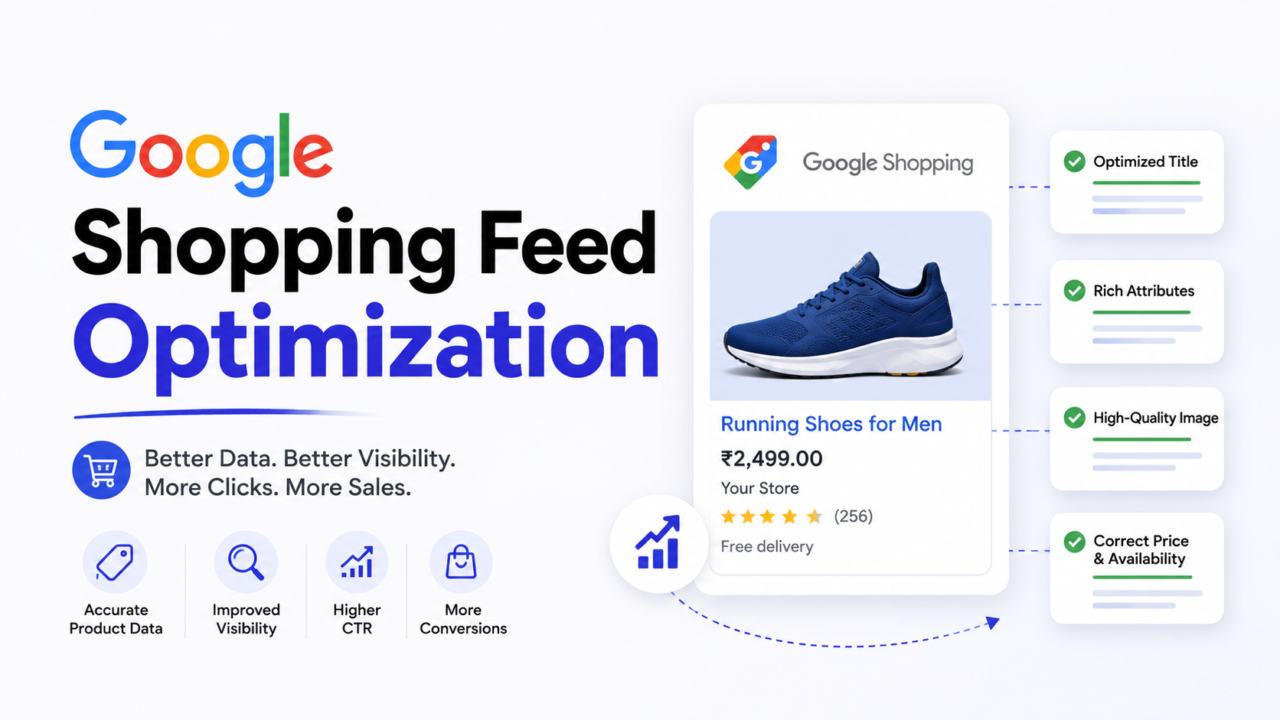
Your best product just stopped showing on Google. No warning. No email you noticed. Sales for that SKU dropped, and you blamed the algorithm.
It was not the algorithm. It was your feed.
A Google Shopping feed is the data file that tells Google what you sell, what it costs, and whether it is in stock. When that file has errors, Google does the simplest thing possible: it hides the product. No impressions. No clicks. No sales. And it happens quietly, one SKU at a time, until a chunk of your catalog has vanished from search.
This guide shows you the errors that kill ad reach, how to fix them in the right order, and how to keep them from coming back. We run feeds like infrastructure, not a one-time upload. That is the difference between products that sell and products that disappear.
Key Takeaways
- A Google Shopping feed is a structured product data file that controls what Google can show in Shopping ads and free listings.
- Most lost ad reach comes from disapproved products, not low bids or bad targeting.
- Price and availability mismatches between your feed and your live site are the most common and most damaging error.
- Fix errors by severity first, not in the random order Google lists them.
- Google now requires a minimum image size of 500×500 pixels, with full enforcement starting January 31, 2027.
- Titles can be up to 150 characters, but only about 70 show, so front-load the words that matter.
Why Feed Errors Quietly Destroy Your Sales
Google Shopping runs on trust. Google reads your feed, crawls your product page, and checks that the two match. If anything looks off, it disapproves the product to protect the shopper.
Here is why this hurts more than people expect:
- Disapproved products get zero reach. Not reduced reach. Zero.
- One bad error type can disapprove a whole product line at once.
- Errors compound during peak season, exactly when you need reach most.
- You keep spending on the products that still show, while winners sit dead.
So the goal is not “more ad spend.” The goal is a clean feed where every product is eligible to show. Reach you already paid for, unlocked.
The Errors That Kill Ad Reach Most
Not all feed errors are equal. Some pull a product offline instantly. Others are warnings you can fix later. Below are the ones that actually cost you reach, ranked by how much damage they do.
1. Price and Availability Mismatch (the silent killer)
This is the most common disapproval, and the most expensive.
It happens when your feed says one thing and your live product page says another. When your feed shows a different price, currency, or stock status than what’s on your product page, Google flags it as a price or availability mismatch.
Common causes:
- You changed a price on your site but the feed did not refresh.
- A flash sale ended, but the feed still shows the sale price.
- An item sold out, but the feed still says “in stock.”
Why it is so dangerous: this is not always a simple product disapproval. Warnings about price and availability mismatch between the feed and the landing pages result in preemptive item disapproval, which is still account-level enforcement and requires an account review to fully resolve.
How to fix it:
- Connect your store to Merchant Center so prices and stock sync automatically, ideally hourly.
- Make sure your feed price, sale price, and availability match your product page and your checkout.
- Do not let manual uploads be your only update method.
2. Missing Required Attributes
If a required field is empty, Google often refuses to show the product.
At a minimum, most feeds need: id, title, description, link, image link, price, availability, and brand. Products with no clear brand also need a GTIN or MPN. Apparel adds more, like color, size, age group, and gender.
The error usually reads “Missing required attribute” and names the field. The fix is simple: map that field correctly in your feed and refill the blanks.
3. Missing or Invalid GTIN
A GTIN is the barcode number that uniquely identifies a product. Google uses it to understand exactly what you are selling and to match it to shopper searches.
When the GTIN is missing or wrong, Google has less confidence in your listing, which can mean fewer impressions or outright disapproval. Shoppers who search by a model or part number are often close to buying, so a missing GTIN costs you high-intent traffic.
Fix it by adding the correct manufacturer GTIN for each product. If a product truly has no GTIN, mark it correctly so Google knows to expect none.
4. Image Problems (and the 2026 to 2027 size change)
Bad images get products disapproved, and the rules are about to get stricter. This is the single biggest source of disapprovals, so it deserves real attention.
Here is the timeline that matters, straight from Google:
- Today’s hard minimum: images must be at least 100×100 pixels, or 250×250 for apparel.
- The new minimum: Google is raising the floor to 500×500 pixels for all products and all marketing methods.
- Warning phase: Merchant Center starts showing warnings on April 14, 2026 for images that fall short.
- Enforcement: the 500×500 rule is enforced starting January 31, 2027.
- What Google actually recommends: 1500×1500 pixels or above for best performance across every listing format.
So 500×500 keeps you compliant, but 1500×1500 is the target if you want products to look sharp on every surface and earn clicks. If your catalog uses old supplier images, audit them now. You have a runway, but do not wait for the warnings to pile up.
Image rules to follow:
- Aim for 1500×1500 pixels. Treat 500×500 as the floor, not the goal.
- Do not upscale small images. The artifacts are detectable and look worse than the original.
- Show the product clearly, with a white or plain background.
- Avoid watermarks, logos, or promotional text like “SALE” or “20% off.” This is the most common image violation.
- Use a real product photo, not a placeholder or line drawing.
- Add extra images with the additional image link attribute. Google allows up to 10, and they help your product stand out.
5. Policy and Trust Violations
Some errors are about your store, not a single product. These can suspend the whole account.
Watch for these triggers:
- No clear return and refund policy on your site.
- Missing or wrong shipping details.
- Prices in the feed that do not match what shoppers pay at checkout.
- Claims Google does not allow, especially in health and supplements.
These fixes usually live on your website, not just in the feed. Add a clear return policy page. Show accurate shipping. Keep every claim honest and supported.
6. Invalid Product URL
If your landing page link is broken, redirects oddly, or loads a “not found” page, Google disapproves the product. Test your URLs, fix dead links, and make sure each product link goes straight to a working, matching page.
The AcquireX FIX-FIRST Method: Repair in the Right Order
Most merchants open Merchant Center, see 200 disapproved products, and freeze. Then they fix random errors that barely move revenue.
Do not do that. Triage by two things: how much reach the error costs, and how hard it is to fix. Here is the order we use.
F. Fatal first. Price and availability mismatches and account policy suspensions. These are critical and stop reach across your whole account. Fix today.
I. Identifiers next. Missing GTINs and missing required attributes. High impact, usually a quick mapping fix.
X. eXposure savers. Image quality and broken images. These hit high-traffic products hard and are worth the medium effort.
Then the rest. Invalid URLs, shipping and tax setup, wrong product category, and duplicate IDs. Important, but they come after the bleeding stops.
Last. Optional attribute warnings. They polish the feed but rarely change reach on their own.
This order matches how the pros prioritize. The right approach is to triage by revenue impact and fix effort: price and availability mismatches and policy suspensions are critical and come first, then GTIN and required attribute issues and image problems, with wrong category, duplicate IDs, and optional warnings handled last.
Optimize Titles and Descriptions for More Reach
Fixing errors makes products eligible to show. Optimizing your data is what makes them show more, and to the right people.
Titles: Your Single Biggest Lever
Your feed title decides which searches trigger your product. It does not have to match your website title, and often it should not.
The rules:
- You can submit titles up to 150 characters, but Google only displays up to 70 on Shopping ads and free listings, so aim for 70 or fewer when you can.
- Put distinctive product attributes at the beginning of the title.
- Use keywords that connect your product to a shopper’s search.
Simple title formulas that work:
- Apparel: Brand + Gender + Product Type + Color + Size + Material
- Electronics: Brand + Product + Model Number + Key Spec
So “Running Shoes” becomes “Nike Women’s Running Shoes, Black, Size 8, Mesh.” Same product, far more matches.
Descriptions: Feed the Match Engine
The description helps Google match your product to longer, more specific searches. You can write up to 5,000 characters.
Make it count:
- Cover real features, materials, sizes, and use cases.
- Include alternative names and terms real shoppers type.
- Put the most important details in the first few lines.
- Skip the fluff. Clear beats clever.
Categories: Help Google Place You Right
Google has a fixed list of product categories. Mapping each product to the most accurate one helps your ad show for the correct searches. Do not invent categories like “best sellers,” and do not guess. Pick the closest real match from Google’s taxonomy.
Why Your Feed Decides How Performance Max Performs
If you run Performance Max, your feed matters even more, not less.
Performance Max hands targeting, bidding, and placement to Google’s automation. But automation cannot fix bad data. If your titles are vague, your attributes are thin, or your images are weak, the system learns slowly and scales badly. A clean feed is what lets Performance Max find the right buyers fast.
Two simple moves give you control inside an automated campaign:
- Use custom labels to group products by margin, bestseller status, season, or stock priority. Then you can steer budget toward the SKUs that actually make money.
- Segment your feed so high-value products and long-tail products can be managed differently, even when the campaign is automated.
The takeaway: in 2026, your feed is your campaign structure. The brands that win with Performance Max are the ones that feed it clean, complete, well-labeled data.
New 2026 Feed Changes You Should Not Miss
Google updated its product data specification in April 2026. A few changes are easy to overlook and worth acting on early:
- New image minimum (500×500). Covered above. Warnings start April 14, 2026, enforcement January 31, 2027.
- New video attribute. You can now add a product video with the video link attribute. Video can help your listing stand out, especially for products that are easier to understand in motion.
- Product-level shipping controls. Google added more granular shipping options at the product level, which helps you show accurate delivery info and avoid shipping-related disapprovals.
Acting on these now, before enforcement, keeps your catalog clean while competitors wait for warnings to force their hand.
Go Beyond Approval: Earn Trust Badges That Lift Reach
Fixing errors gets you eligible. Trust signals get you chosen.
Google rewards stores that give shoppers a great experience. Two things are worth chasing:
- Top Quality Store badge. Google looks at fast shipping, clear return policies, a high-quality site, and strong reviews. Check your standing in the Shopping Experience Scorecard inside Merchant Center, where Google gives you personalized fixes.
- Sale and special offer badges. Use the sale price attribute and Merchant Center promotions so your listing shows a price cut or special offer. Badges lift click-through rate without raising your bid.
These are not feed errors, but they decide whether a shopper picks your product over a competitor sitting right next to you in the results.
Keep Your Feed Healthy (So Errors Stop Coming Back)
A clean feed is not a project you finish. It is a system you run.
Build these habits:
- Check Diagnostics weekly. This is where Google tells you what is broken. Ignoring it is the most expensive habit in Shopping.
- Automate feed refreshes. Sync price and stock often so mismatches never appear.
- Add structured data to product pages. It helps Google confirm your feed matches your site and prevents disapprovals.
- Use sale price the right way. Update both the site and the feed so you earn a sale badge instead of a mismatch flag.
- Audit before peak season. Disapprovals spike when traffic is highest. Get clean before the rush, not during it.
Frequently Asked Questions
What is a Google Shopping feed?
A Google Shopping feed is a structured data file that lists your products with details like title, price, image, and availability. Google uses it to decide what to show in Shopping ads and free product listings.
Why are my products disapproved in Google Merchant Center?
The most common reasons are price or availability mismatches between your feed and your site, missing required attributes, missing GTINs, low-quality images, and policy issues like a missing return policy. Each one can pull a product offline until fixed.
How long does it take for a fixed product to show again?
After you fix the error and Google recrawls your data, products usually return within a few days. Account-level issues, like a price mismatch flagged as preemptive disapproval, require a review and can take longer.
What is the ideal Google Shopping title length?
You can use up to 150 characters, but Google only shows about 70. Put your most important keywords and product details in the first 70 characters so they are visible.
What image size does Google Shopping require now?
Today the hard minimum is 100×100 pixels, or 250×250 for apparel. Google is raising the minimum to 500×500 pixels for all products, with warnings starting April 14, 2026 and enforcement on January 31, 2027. For best performance, Google recommends 1500×1500 pixels or above.
Can my feed title be different from my website title?
Yes. Your feed title can and often should be more keyword-rich than your website title, as long as it accurately describes the product on the landing page.
Does feed optimization matter if I run Performance Max?
Yes, even more. Performance Max relies on your product data to target and bid. If your feed is incomplete or vague, automation learns slowly and wastes budget. A clean, well-labeled feed is what lets Performance Max scale efficiently.
How do I know if my feed changes are working?
Track impressions, click share, click-through rate, cost per conversion, and ROAS by feed segment across Merchant Center and Google Ads. If a product’s impressions drop suddenly, revisit its title, image, and attributes first.
Stop Fighting Your Feed. Build a System That Sells.
Feed errors are not a one-time cleanup. They come back every time you change a price, add a product, or run a sale. Fixing them by hand, again and again, is not a strategy. It is a leak.
AcquireX builds and manages Google Shopping feeds as part of a dedicated ecommerce team embedded in your business. We audit your catalog, fix what is killing your reach, and keep the feed clean so your products stay eligible to sell. You focus on growth. We handle execution.
Talk to our team and put a system behind your feed.