Quick answer: A customer service QA scorecard is a weighted rubric for grading support conversations. For ecommerce, build it around four categories (resolution, policy and order accuracy, process, and brand voice), add auto-fail rules for costly mistakes, review a stratified weekly sample, calibrate reviewers monthly, and tie every score to coaching.
Most QA scorecard templates online were written for call centers. They grade the greeting, the hold etiquette, and whether the agent said the customer’s name three times. An ecommerce support ticket is different. The agent is usually touching money and orders: issuing a refund in Shopify, creating a replacement, editing an address before fulfillment, quoting a return window, or deciding whether a “where is my order” ticket needs a carrier claim. A friendly reply that refunds the wrong amount is not a good ticket.
This guide shows you how to build a customer service QA scorecard that reflects how online stores actually lose money and customers. You will get a ready-to-copy template, a worked scoring example, a sampling plan, a calibration routine, and a rollout plan that works for in-house, offshore, and outsourced teams.
What is a customer service QA scorecard?
A customer service QA (quality assurance) scorecard is the rubric reviewers use to grade individual support conversations, whether email, chat, social DMs, or calls. Each criterion has a definition, a scoring scale, and a weight. Every reviewed conversation gets a score that is comparable across agents, channels, and weeks.
The scorecard answers a question your dashboards cannot: was this conversation handled the right way? Metrics like first response time, CSAT, and resolution time tell you what happened at scale. QA tells you why. If you are already tracking the metrics in our guide to ecommerce customer support KPIs that predict retention, QA is the layer that explains movements in those numbers.
QA scorecard vs CSAT vs KPIs: what is the difference?
| Signal | Who judges it | What it tells you | Blind spot |
|---|---|---|---|
| QA scorecard | Trained internal reviewer | Whether the agent followed policy, resolved correctly, and represented the brand | Only covers a sample of tickets |
| CSAT / survey | The customer | How the customer felt about the interaction | Low response rates; customers rate the outcome (e.g. refund denied), not the agent |
| Operational KPIs | Your helpdesk data | Speed, volume, backlog, reopen rate | Fast is not the same as correct |
| Repeat contact rate | Your helpdesk data | Whether the issue stayed solved | Does not show which step failed |
The healthiest support teams use all four together. A ticket with high CSAT but a failed QA score (for example, an agent who refunded an order that was outside the return window) is exactly the kind of quiet leak that only QA catches.
Why does ecommerce support need its own QA scorecard?
Generic templates under-weight the things that cost an online store real money. In ecommerce support, the expensive mistakes are usually not rudeness. They are:
- Wrong financial actions: refunding the full order instead of one line item, refunding and also shipping a replacement, or forgetting to cancel a fulfillment before refunding.
- Policy drift: quoting a 60-day return window when the policy is 30, or approving exceptions with no note explaining why.
- Order and data errors: editing the wrong address, merging the wrong customer profiles, or sharing order details with someone who has not verified they own the order.
- Missed root causes: answering a “where is my order” ticket without noticing the carrier scan has not moved for a week. Our guide to reducing WISMO tickets covers how much of that volume is preventable.
- Chargeback exposure: poor documentation of what was promised, which later weakens your evidence if the customer disputes the charge. See chargeback management for D2C brands for why ticket notes matter in disputes.
A good ecommerce scorecard puts the heaviest weight on getting the resolution and the money right, then on process, then on tone. Tone still matters, but it should not be able to rescue a ticket that cost you a refund you did not owe.
What should an ecommerce QA scorecard include?
Keep it to four weighted categories, five to eight criteria in total, and a short auto-fail list. Here is a template you can copy into a spreadsheet or your helpdesk’s QA tool.
| Category (weight) | Criterion | What a full score looks like |
|---|---|---|
| Resolution (35%) | Correct resolution | The real problem is solved, not just answered. The customer does not need to write back about the same issue. |
| Resolution (35%) | Ownership | Agent anticipates the obvious next question (e.g. sends the return label and explains when the refund lands). |
| Policy & order accuracy (30%) | Policy accuracy | Return windows, warranty terms, shipping promises, and exceptions match current policy; exceptions are noted with a reason. |
| Policy & order accuracy (30%) | Correct order actions | Refunds, replacements, cancellations, address edits, and discount codes are correct in amount and scope in the store admin. |
| Process (15%) | Verification & privacy | Identity checked before sharing or changing order details; no unnecessary personal data in replies. |
| Process (15%) | Tagging, notes & macros | Ticket tagged with the right contact reason; internal note explains what was done and why; macro personalized. |
| Brand voice (20%) | Tone & empathy | Acknowledges the situation, matches brand voice, no robotic or defensive phrasing. |
| Brand voice (20%) | Clarity | Short, scannable, no jargon; the customer knows exactly what happens next and when. |
Which mistakes should be auto-fail?
Auto-fail (also called critical errors) override the weighted score and set the ticket to zero. Use them sparingly, only for mistakes with real legal, financial, or trust consequences:
- Sharing order or personal details with someone who has not been verified.
- Issuing a refund, credit, or replacement that clearly breaks policy without an approved exception.
- Promising something the business cannot deliver (a delivery date, a stock date, a price match you do not offer).
- Abusive, discriminatory, or unprofessional language.
- Ignoring a safety, allergy, or product-defect report that should have been escalated.
Track auto-fails separately from the average score. One auto-fail is a coaching conversation; a pattern of them is usually a training or policy-documentation gap, not a people problem.
How do you score each criterion?
The scale matters less than consistency. Three options work well:
| Scale | Best for | Pros | Cons |
|---|---|---|---|
| Binary (yes / no) | High volume, newer QA programs | Fast, very consistent between reviewers | Hides the difference between “almost” and “poor” |
| 3-point (miss / partial / meet) | Most ecommerce teams | Simple but still captures partial credit | Reviewers need clear examples of “partial” |
| 5-point (1–5) | Mature teams with calibration | Most nuance for coaching | More reviewer disagreement without calibration |
Whichever you pick, write a one-line definition and a real example ticket for each score level. “Tone: 3 = friendly but generic macro; 5 = macro personalized to the customer’s situation” is far more useful than “Tone: rate 1 to 5.”
A worked scoring example
Here is how one ticket scores on a 3-point scale (0 = miss, 0.5 = partial, 1 = meet) with the weights above. A customer writes that one of three items in their order arrived damaged. The agent apologizes, issues a refund for that line item, and closes the ticket, but does not ask for a photo (which your policy requires for damage claims) and does not tag the contact reason.
| Criterion | Weight | Score | Weighted points |
|---|---|---|---|
| Correct resolution | 17.5% | 1 (meet) | 17.5 |
| Ownership | 17.5% | 0.5 (partial; did not offer a replacement option) | 8.75 |
| Policy accuracy | 15% | 0 (miss; skipped photo requirement) | 0 |
| Correct order actions | 15% | 1 (meet; correct line-item refund) | 15 |
| Verification & privacy | 7.5% | 1 | 7.5 |
| Tagging, notes & macros | 7.5% | 0 (miss; no tag, no note) | 0 |
| Tone & empathy | 10% | 1 | 10 |
| Clarity | 10% | 1 | 10 |
| Total | 100% | 68.75% |
The customer probably left happy, so CSAT would look fine. QA shows two fixable process gaps that, repeated across hundreds of damage claims, mean refunds without evidence and no clean data on how often products arrive damaged. That is the point of the scorecard: one coaching note fixes both.
How many tickets should you review, and which ones?
Random sampling alone tends to surface easy tickets, because most support volume is routine. A stratified sample gives you a truer picture. For each agent, each week, pull a fixed number of tickets from these buckets:
- Random: a few tickets from normal volume, to see everyday quality.
- Money-touching: refunds, replacements, cancellations, and store credit.
- Negative signals: low CSAT, reopened tickets, and anything escalated.
- New or changed policies: after a policy update, a product launch, or a promotion, oversample that contact reason for two to four weeks.
- Channel mix: make sure chat, email, and social are all represented if agents work across them.
Choose a volume your reviewers can sustain every single week. A small, consistent sample with real coaching beats an ambitious one that gets skipped whenever the queue spikes.
How do you run QA calibration so scores stay fair?
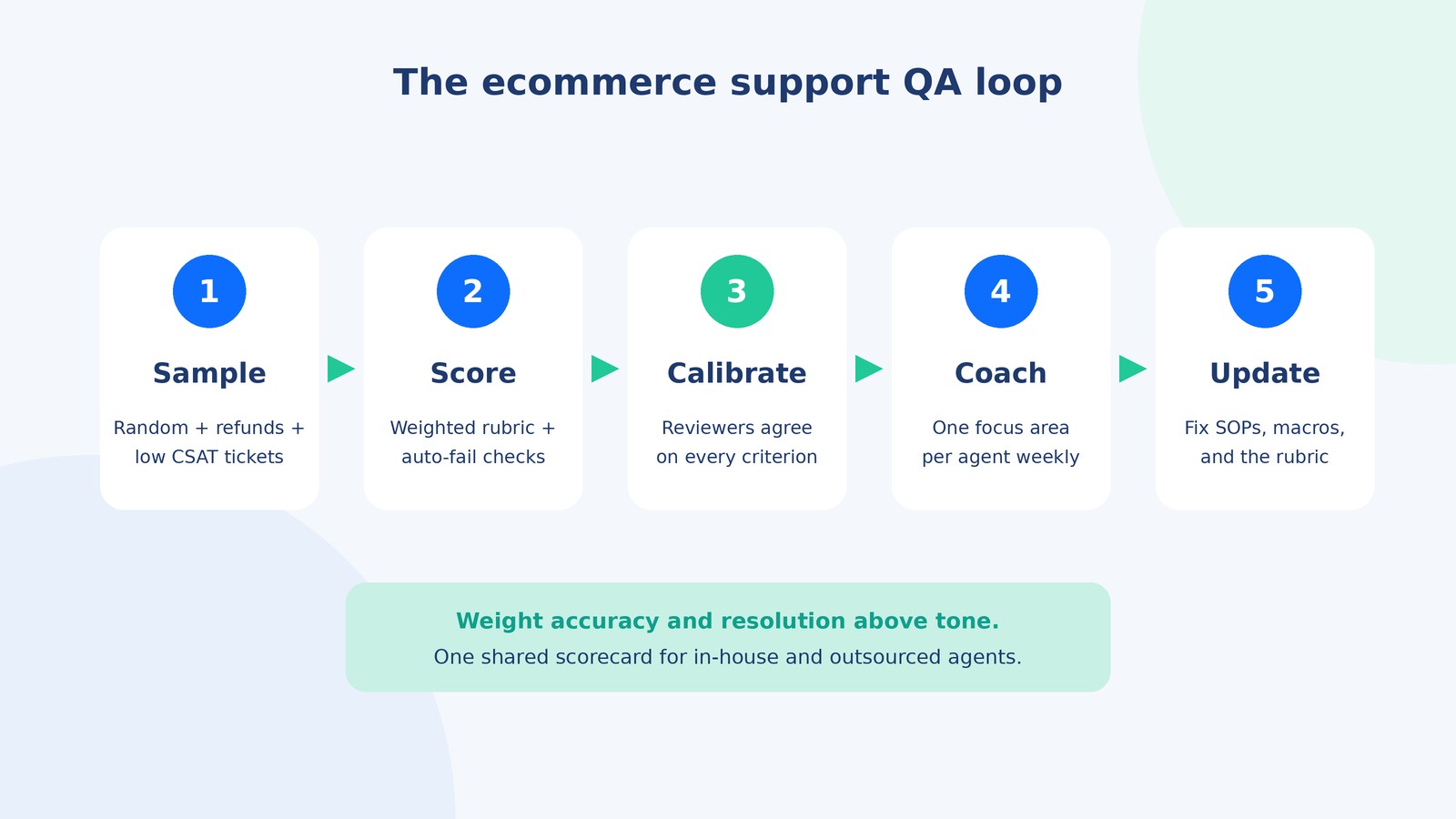
Without calibration, two reviewers can grade the same ticket very differently, and agents quickly stop trusting QA. A simple monthly routine:
- Pick five to ten recent tickets, including at least one borderline case.
- Every reviewer (team leads, QA analyst, and the outsourcing partner’s QA lead if you have one) scores them independently.
- Compare scores criterion by criterion. Discuss only the criteria where reviewers disagreed.
- Agree on the “right” score and, crucially, update the rubric definitions or example tickets so the same disagreement does not come back.
- Track the spread between reviewers over time. A shrinking spread means your rubric is getting clearer.
Invite an agent or two to calibration occasionally. Hearing how scores are decided builds far more buy-in than a score appearing in a dashboard.
How do you turn QA scores into coaching?
A score with no conversation attached changes nothing. Build a short loop:
- Weekly one-to-ones: review two tickets per agent, one strong and one to improve, using the actual conversation text.
- One focus area at a time: pick the lowest-scoring criterion and coach on that only until it improves.
- Team-level patterns: if most agents miss the same criterion, it is a documentation or training problem. Fix the macro, the help-center article, or the SOP instead of coaching each person. Our guide to writing ecommerce SOPs for a remote team shows how to make policies easy to follow.
- Dispute process: let agents appeal a score with a short note. Appeals reveal unclear rubric wording faster than anything else.
Should QA be manual, automated, or both?
Most helpdesks and dedicated QA tools now offer AI-assisted review. Used well, it lets you look at far more conversations than a human team can. Used badly, it produces confident scores on criteria that need judgment.
| Approach | What it does well | What it misses | Best use |
|---|---|---|---|
| Manual review | Judgment calls: was the refund right, was the exception justified, did the agent read the order history | Covers a small share of tickets | Money-touching and escalated tickets; coaching |
| Automated / AI scoring | Observable checks on every ticket: greeting, tag present, tracking link included, sentiment, response length | Business context and policy nuance; can be confidently wrong | Coverage, trend spotting, and flagging tickets for human review |
| Hybrid | AI flags risky or low-quality tickets; humans grade the flagged ones plus a random sample | Requires setup and periodic checks of AI accuracy | Teams handling high volume across channels |
If you are choosing or changing helpdesks, QA features are worth weighing alongside routing and automation. Our comparison of Gorgias vs Zendesk vs Re:amaze for Shopify is a good starting point.
How do you run QA across in-house, offshore, and outsourced agents?
Quality problems with outsourced support usually come from two different standards, not from the partner’s agents. The fix is structural:
- One scorecard for everyone. In-house, offshore, and partner agents are graded on the same rubric with the same weights and auto-fail list.
- Put QA in the agreement. Agree on sample size, pass line, calibration cadence, and what happens when an agent repeatedly falls below the line.
- Shared visibility. The partner’s QA lead and your team see the same scores and the same tickets. No separate reports that never reconcile.
- Joint calibration. Include the partner’s reviewers in your monthly calibration so “meets expectations” means the same thing in every time zone. Our guide to managing offshore teams across time zones covers how to schedule this without burning anyone out.
- Policy changes ship with QA notes. When a return policy changes, update the rubric examples the same day.
If you are weighing whether to bring in a partner at all, see our guide to ecommerce customer service outsourcing for the trade-offs.
Want support quality you do not have to police? AcquireX’s customer service management for ecommerce gives you a dedicated support team trained on your store, policies, and brand voice, with QA scorecards, calibration, and weekly reporting built in. You see every score and every reviewed ticket.
Book a call with AcquireX to see how a QA-led support team would work for your brand.
How do you roll out a QA scorecard in 30 days?
| Week | Focus | Output |
|---|---|---|
| Week 1 | Draft the rubric from your top contact reasons and most expensive past mistakes | Scorecard with definitions, weights, auto-fail list |
| Week 2 | Pilot: two reviewers score the same sample independently | First calibration notes; rubric wording fixes |
| Week 3 | Introduce to agents with example tickets; open the appeal process | Agents understand how they are scored |
| Week 4 | Go live with the weekly sample and one-to-one coaching | Baseline QA score per agent and per criterion |
After the first month, review the scorecard every quarter. Drop criteria everyone always passes, add criteria for new risks (a new marketplace, a subscription program, a new returns flow), and rebalance weights if they no longer reflect what costs you money.
What are the most common QA scorecard mistakes?
- Too many criteria. Twenty line items make grading slow and coaching unfocused.
- Weighting tone above accuracy. A warm reply that gives away an unearned refund should not pass.
- Grading only random tickets. You miss the money-touching and escalated conversations where quality matters most.
- No calibration. Scores vary by reviewer, and agents stop trusting the process.
- Using QA only for performance reviews. If QA feels purely punitive, agents optimize for the rubric instead of the customer.
- Never updating the rubric. Policies, products, and channels change; a stale scorecard grades yesterday’s job.
Key takeaways
- A customer service QA scorecard grades whether a conversation was handled correctly, which CSAT and speed metrics cannot tell you.
- For ecommerce, weight resolution and policy and order accuracy above process and tone.
- Keep five to eight criteria, a short auto-fail list, and a clear example for every score level.
- Review a stratified weekly sample that always includes refunds, escalations, and low CSAT tickets.
- Calibrate monthly, coach weekly, and use one shared standard for in-house and outsourced agents.
Frequently asked questions
What is a customer service QA scorecard?
A customer service QA scorecard is a standard rubric reviewers use to grade individual support conversations against defined criteria, such as resolution, policy accuracy, process, and tone. Each criterion is weighted, so every reviewed ticket gets a comparable score you can coach against and trend over time.
How many criteria should a QA scorecard have?
Most ecommerce teams do best with five to eight criteria grouped into three or four categories, plus a short list of auto-fail items. Fewer criteria keep grading fast and consistent; more than about ten tends to slow reviewers down and spreads attention too thin.
What is a good QA score for ecommerce support?
There is no universal benchmark, because the score depends entirely on how strict your rubric is. Many teams set a pass line somewhere around 80 to 85 percent and treat anything far below it as a coaching trigger, then adjust after a few calibration cycles.
How many tickets should we review per agent?
Pick a fixed number per agent per week that your reviewers can sustain, often a handful of tickets, and stratify the sample so refunds, cancellations, escalations, and low CSAT tickets are always included. Consistency matters more than volume.
Should QA be done by team leads or a dedicated QA analyst?
Small teams usually start with team leads grading each other’s agents. Once you have more than a couple of pods or an outsourced partner, a dedicated QA analyst who also runs calibration keeps scores consistent and removes the bias of leads grading their own people.
What is QA calibration?
Calibration is a recurring session where several reviewers grade the same tickets independently, compare scores, and agree on how the rubric should be applied. It is the single best way to keep a scorecard fair, and teams that skip it usually end up with scores nobody trusts.
Can AI replace manual QA reviews?
AI can score every conversation for simple, observable items such as greeting, tagging, or whether a tracking link was included, and it can flag risky tickets for humans. Judgment-heavy criteria, like whether a refund decision was right, still need a trained human reviewer.
How do you run QA with an outsourced support team?
Use one shared scorecard for in-house and outsourced agents, agree on the sample and pass line in the contract, run joint calibration, and give the partner access to the same QA results you see. The goal is one quality standard, not two.