Summary: Product schema markup is JSON-LD code on a product page that tells search engines and AI assistants exactly what you sell: name, image, price, currency, stock status, identifiers, shipping, and returns. Done right, it makes your pages eligible for product rich results and merchant listings. Done wrong, it is ignored or flagged. The rule that matters most: every value must match what the shopper sees.
Most ecommerce stores already have some product schema, usually generated by the theme. The problem is that “some” is rarely complete, often duplicated by apps, and sometimes out of sync with the real price or stock level. This guide explains what Google actually requires, shows copy-ready JSON-LD for simple products, variants, shipping, and returns, walks through Shopify and WooCommerce implementation, and gives you an audit checklist your team can run across an entire catalog.
What is product schema markup?
Product schema markup is structured data, written in the Schema.org Product vocabulary, that describes a product in a machine-readable format. On ecommerce sites it is almost always added as a JSON-LD script block in the page HTML. It does not change what shoppers see. It changes how confidently crawlers can read your page.
Think of it as a structured copy of your buy box. The visible page says “Charcoal, size M, $18, in stock, free shipping, 30-day returns” in design and prose. The JSON-LD says the same thing in fields a machine never has to guess at.
Why does product schema matter for ecommerce SEO?
Structured data is not a direct ranking boost, and Google says rich results are never guaranteed. What it does is make your page eligible for richer search features and remove ambiguity about your product data. For a store, that has three practical benefits:
- Richer search listings. Product snippets can show price, availability, and review stars. Merchant listings can surface your products in shopping-style results, including shipping and return details.
- Better matching with Merchant Center. Google uses on-page structured data to verify and match the products in your feed. Mismatches between your page and feed are a common cause of disapprovals, as we cover in our guide to fixing Google Merchant Center suspensions.
- Clean input for AI shopping answers. Assistants and AI search features summarize products from many signals. Explicit, consistent fields for price, GTIN, brand, and stock make your product data easier to extract accurately than prose alone.
The quotable version: schema does not make a weak product page rank, but it makes a strong product page easier to understand, display, and trust.
What is the difference between product snippets and merchant listings?
Google documents two separate product experiences that both read Product markup. Knowing which one you are targeting tells you which fields are mandatory.
| Feature | Product snippets | Merchant listings |
|---|---|---|
| Who it is for | Any page about a product, including review and comparison pages | Pages where the shopper can buy the product directly from you |
| Required properties | name plus at least one of offers, review, or aggregateRating |
name, image, and offers (a single Offer with price and currency) |
| AggregateOffer allowed? | Yes | No, a specific Offer is required |
| What can appear in results | Price, availability, ratings, review snippets | Price, availability, shipping, returns, and shopping-style placements |
| Search Console report | Product snippets | Merchant listings |
If you run a store, build for merchant listings. A page that satisfies merchant listing requirements will generally satisfy product snippet requirements too.
Which product schema properties should you include?
Here is a practical priority list for a direct-to-consumer product detail page, based on Google’s merchant listing documentation.
| Property | Priority | Where the value should come from |
|---|---|---|
name |
Required | Product title (include the variant if the URL is variant-specific) |
image |
Required | Crawlable product images, ideally in 1×1, 4×3, and 16×9 crops |
offers.price + offers.priceCurrency |
Required | The price the shopper actually pays right now, with a period decimal separator |
offers.availability |
Strongly recommended | Live inventory status (InStock, OutOfStock, PreOrder, BackOrder) |
gtin / mpn, sku |
Strongly recommended | Barcode field and SKU in your catalog or PIM |
brand.name |
Recommended | Vendor or brand field, one brand only |
description |
Recommended | Plain-text product description |
shippingDetails |
Recommended | Your shipping rate table and delivery times |
hasMerchantReturnPolicy |
Recommended | Your published returns policy |
aggregateRating / review |
Recommended if real | Your review platform, only for ratings visible on the page |
itemCondition, color, size, material |
Optional | Product attributes and variant options |
Notice the third column. Every field should be pulled from a single source of truth, not typed in by hand. Most schema errors at scale are really catalog data errors. If titles, barcodes, or attributes are inconsistent, fix that first; our catalog enrichment guide explains how.
What does a correct product schema example look like?
This is a clean, minimal merchant-listing-ready block for a simple product. Place it in the HTML of the product page, inside a <script type="application/ld+json"> tag.
{
  "@context": "https://schema.org",
  "@type": "Product",
  "name": "Merino Crew Sock, Charcoal",
  "description": "Midweight merino wool crew sock with a cushioned sole.",
  "image": [
    "https://example.com/img/sock-charcoal-1x1.jpg",
    "https://example.com/img/sock-charcoal-4x3.jpg",
    "https://example.com/img/sock-charcoal-16x9.jpg"
  ],
  "sku": "MCS-CHAR-M",
  "gtin13": "0123456789012",
  "brand": { "@type": "Brand", "name": "ExampleBrand" },
  "offers": {
    "@type": "Offer",
    "url": "https://example.com/products/merino-crew-sock?variant=charcoal-m",
    "price": "18.00",
    "priceCurrency": "USD",
    "availability": "https://schema.org/InStock",
    "itemCondition": "https://schema.org/NewCondition"
  }
}
A few details that trip up teams:
- Price is a plain number. Use
"18.00", not"$18"or"18,00". The currency belongs inpriceCurrencyas an ISO 4217 code. - Availability uses full Schema.org URLs such as
https://schema.org/InStock. - Brand is an object. A bare string often validates, but a
Brandtype with anameis the documented pattern. - Use the correct GTIN property.
gtinaccepts any valid length;gtin8,gtin12,gtin13, andgtin14must match the barcode length exactly.
How do you add shipping and return policy schema?
Shipping and returns are where many stores leave value on the table. Google can display delivery cost, delivery time, and return windows in merchant listings. You can supply them in two ways: account-level settings in Google Merchant Center, or shippingDetails and hasMerchantReturnPolicy nested in each Offer. Here is the Offer from the example above, extended:
"offers": {
  "@type": "Offer",
  "price": "18.00",
  "priceCurrency": "USD",
  "availability": "https://schema.org/InStock",
  "shippingDetails": {
    "@type": "OfferShippingDetails",
    "shippingRate": { "@type": "MonetaryAmount", "value": "0", "currency": "USD" },
    "shippingDestination": { "@type": "DefinedRegion", "addressCountry": "US" },
    "deliveryTime": {
      "@type": "ShippingDeliveryTime",
      "handlingTime": { "@type": "QuantitativeValue", "minValue": 0, "maxValue": 1, "unitCode": "DAY" },
      "transitTime": { "@type": "QuantitativeValue", "minValue": 2, "maxValue": 5, "unitCode": "DAY" }
    }
  },
  "hasMerchantReturnPolicy": {
    "@type": "MerchantReturnPolicy",
    "applicableCountry": "US",
    "returnPolicyCategory": "https://schema.org/MerchantReturnFiniteReturnWindow",
    "merchantReturnDays": 30,
    "returnMethod": "https://schema.org/ReturnByMail",
    "returnFees": "https://schema.org/FreeReturn"
  }
}
Keep these fields honest. If your free shipping only applies over a threshold, a flat “0” rate is misleading. If returns are 30 days for most items but final sale for clearance, your markup on clearance pages should reflect that. If you manage shipping and returns centrally in Merchant Center, make sure the on-page markup does not contradict it.
How should you mark up product variants?
Variants are where most ecommerce schema breaks. A single product page might offer six colors and five sizes, each with its own SKU, price, stock, and sometimes URL. Google supports a ProductGroup pattern for this: one parent group with shared properties, and each variant as a Product inside hasVariant.
{
  "@context": "https://schema.org",
  "@type": "ProductGroup",
  "name": "Merino Crew Sock",
  "productGroupID": "MCS",
  "brand": { "@type": "Brand", "name": "ExampleBrand" },
  "variesBy": ["https://schema.org/color", "https://schema.org/size"],
  "hasVariant": [
    {
      "@type": "Product",
      "sku": "MCS-CHAR-M",
      "name": "Merino Crew Sock, Charcoal, M",
      "color": "Charcoal",
      "size": "M",
      "image": "https://example.com/img/sock-charcoal.jpg",
      "offers": {
        "@type": "Offer",
        "url": "https://example.com/products/merino-crew-sock?variant=charcoal-m",
        "price": "18.00",
        "priceCurrency": "USD",
        "availability": "https://schema.org/InStock"
      }
    },
    {
      "@type": "Product",
      "sku": "MCS-NAVY-M",
      "name": "Merino Crew Sock, Navy, M",
      "color": "Navy",
      "size": "M",
      "image": "https://example.com/img/sock-navy.jpg",
      "offers": {
        "@type": "Offer",
        "url": "https://example.com/products/merino-crew-sock?variant=navy-m",
        "price": "18.00",
        "priceCurrency": "USD",
        "availability": "https://schema.org/OutOfStock"
      }
    }
  ]
}
Three rules make variant markup work:
- Give every variant a unique identifier (SKU and, ideally, GTIN) that matches the ID in your product feed.
- Use
variesByto declare which attributes change between variants, such as color or size. - Make variant URLs resolvable. If a variant has its own URL or query parameter, loading that URL should preselect the variant and show the matching price and stock.
If your platform only outputs the first or selected variant, that is acceptable for basic eligibility, but out-of-stock defaults are a common trap: the default variant shows OutOfStock even though five other sizes are available. Defaulting to the first available variant avoids that.
How do you implement product schema on Shopify?
Shopify’s own themes generate basic product JSON-LD through the structured_data Liquid filter. That output typically covers the essentials, but brands often need to add GTIN, brand, shipping, returns, and review data. You have three options:
| Approach | Best for | Watch out for |
|---|---|---|
| Keep theme default | Small catalogs with simple products | Missing recommended fields; limited variant detail |
| Schema or SEO app | Non-technical teams that want reviews, shipping, and returns added | Duplicate Product blocks if the theme markup is not removed; app bloat |
| Custom Liquid snippet | Brands with a developer or dedicated team | Needs testing after every theme update |
A custom snippet gives you full control. This simplified example pulls every value from live product data, so price and stock can never drift from the page:
{%- assign v = product.selected_or_first_available_variant -%}
<script type="application/ld+json">
{
  "@context": "https://schema.org",
  "@type": "Product",
  "name": {{ product.title | json }},
  "description": {{ product.description | strip_html | truncate: 500 | json }},
  "image": {{ product.featured_image | image_url: width: 1200 | prepend: "https:" | json }},
  "sku": {{ v.sku | json }},
  {%- if v.barcode != blank %}"gtin": {{ v.barcode | json }},{% endif %}
  "brand": { "@type": "Brand", "name": {{ product.vendor | json }} },
  "offers": {
    "@type": "Offer",
    "url": {{ shop.url | append: v.url | json }},
    "price": {{ v.price | divided_by: 100.0 | json }},
    "priceCurrency": {{ cart.currency.iso_code | json }},
    "availability": "https://schema.org/{% if v.available %}InStock{% else %}OutOfStock{% endif %}"
  }
}
</script>
Before you ship a custom snippet, remove or disable the theme’s existing Product markup, test a simple product, a variant product, an out-of-stock product, and a sale-priced product, and confirm your currency logic if you sell in multiple markets. If an app adds stars to your pages, check that it is not injecting its own second Product block. Each extra app script also costs page speed, which is why we recommend a periodic Shopify app audit.
How do you implement product schema on WooCommerce and headless stores?
WooCommerce outputs core product structured data by default, and SEO plugins such as Rank Math or Yoast can extend or replace it. The main job is choosing one owner of the Product markup so you do not end up with the core output, a plugin, and a reviews add-on all describing the same product slightly differently.
On headless or custom builds, generate JSON-LD on the server from the same API response that renders the page. Google’s documentation notes that JavaScript-generated product markup can make shopping crawls less frequent and less reliable, which matters for fast-changing price and stock data. Merchant Center’s own guidance asks for structured data in the HTML returned by the server. If your storefront is client-rendered, read our JavaScript SEO guide for ecommerce before relying on client-side injection.
What are the most common product schema errors?
| Error | Why it happens | How to fix it |
|---|---|---|
| Price mismatch between page and markup | Sale price shown on page but regular price in JSON-LD; cached markup | Generate price from the same variable the buy box uses |
| Missing field “offers” or “image” | Theme only outputs partial markup | Add required properties in the template |
| Invalid availability value | Plain text like “in stock” instead of a Schema.org URL | Map inventory states to Schema.org enumeration URLs |
| Duplicate Product entities | Theme, SEO app, and reviews app each add markup | Pick one source; remove the rest |
| Invalid GTIN | Wrong length for the property, placeholders, or internal codes in the barcode field | Clean barcode data; use gtin or the length-specific property correctly |
| Product markup on category pages | Collection templates output Product for every tile | Use Product on product pages only; use ItemList or breadcrumbs on collections |
| Ratings not visible on page | Review data added to JSON-LD but widget hidden or lazy-loaded away | Only mark up ratings shoppers can see on that page |
| Multi-currency confusion | One URL serves different currencies by location | Use distinct URLs per currency, as Google recommends |
How do you test and monitor product schema?
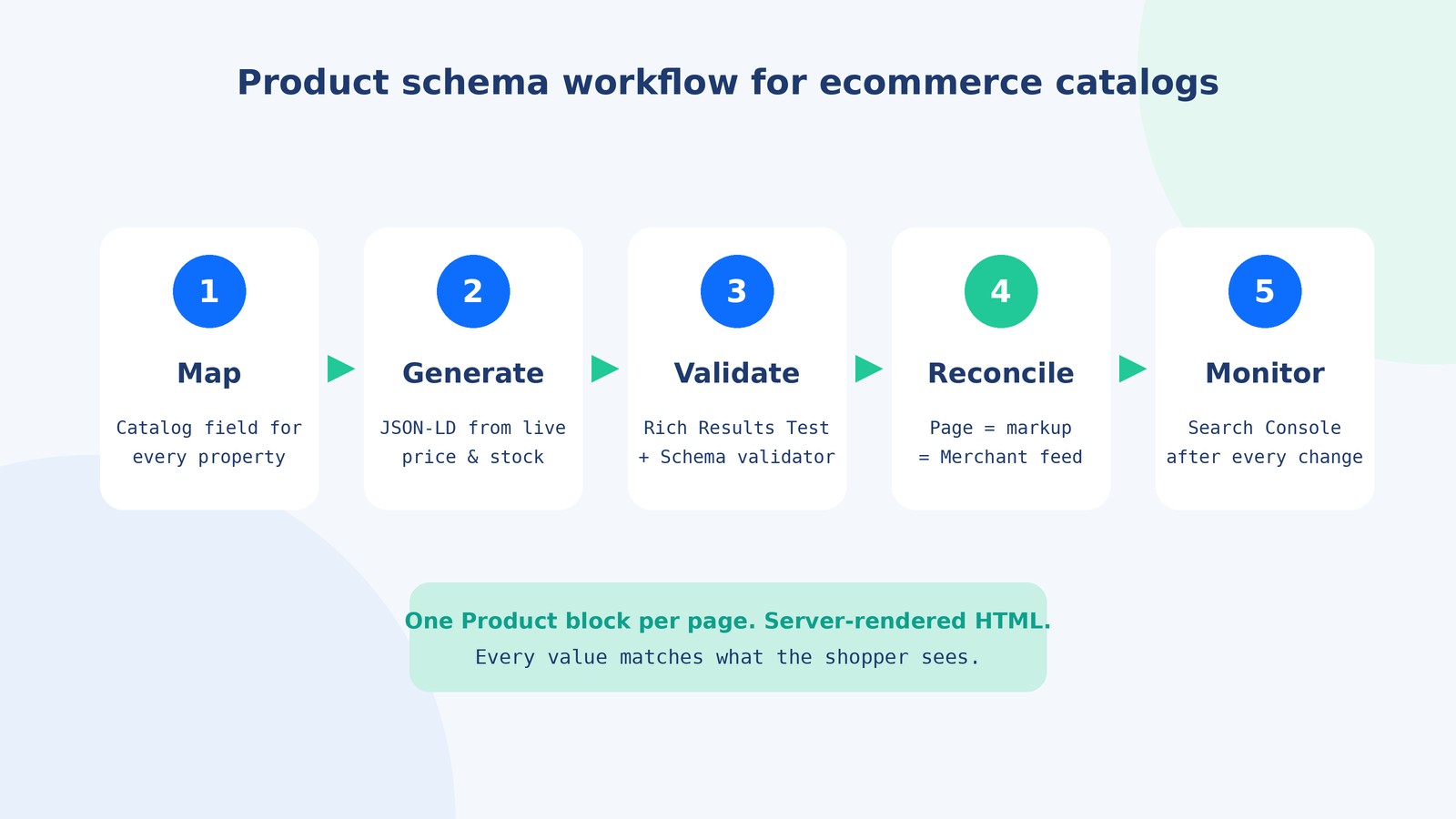
Validation is a two-tool job, followed by ongoing monitoring:
- Google’s Rich Results Test checks whether a URL is eligible for product snippets and merchant listings, and shows the markup Google actually rendered.
- The Schema Markup Validator at validator.schema.org checks general Schema.org syntax, including types Google does not use for rich results.
- Search Console’s Merchant listings and Product snippets reports show errors and warnings across your whole site over time. This is where template-level problems surface.
- URL Inspection confirms that Google can crawl the page and its images.
Treat schema like any other piece of catalog infrastructure. Re-test after theme updates, app installs, pricing changes, and platform migrations, and add a schema check to your release checklist. Errors at the template level spread to every product at once, so a quick test of four representative URLs after each change catches most problems.
How do you audit product schema across a large catalog?
Spot-checking one URL is fine for a ten-product store. For hundreds or thousands of SKUs, use a structured audit:
- Map your data sources. For each schema property, write down which catalog field feeds it. Gaps in this map are gaps in your markup.
- Sample by template, not by product. Test one URL per template and product type: simple, variant, bundle, out of stock, on sale, preorder, and gift card.
- Crawl at scale. SEO crawlers can extract JSON-LD from every product URL so you can compare markup prices and availability against your product export.
- Reconcile with your feed. Product IDs, GTINs, prices, and availability should match across the page, the JSON-LD, and your Merchant Center feed. Our Google Shopping feed optimization guide covers the feed side.
- Fix the source, then re-crawl. Correct the catalog field or template, not individual pages, and confirm the fix in Search Console over the following weeks.
Want clean product data on every page and channel?
Schema problems are usually catalog problems in disguise: missing GTINs, inconsistent titles, stale prices, and variant data nobody owns. AcquireX’s catalog management services give you a dedicated team that maintains product data, attributes, feeds, and listings across Shopify, Amazon, Walmart, and Google, so your structured data stays accurate as your catalog grows.
Book a call with AcquireX to get a catalog and structured data review.
Should you add schema beyond Product?
Product markup does the heavy lifting, but a complete ecommerce setup usually includes a few supporting types:
| Schema type | Where it goes | What it does |
|---|---|---|
| Organization | Homepage or about page | Clarifies your brand name, logo, and contact details |
| WebSite | Homepage | Identifies the site name |
| BreadcrumbList | Product and collection pages | Shows your category path in search results |
| ItemList | Collection pages (optional) | Describes a list of products without pretending the page is one product |
| FAQPage | Pages with genuine Q&A content | Structures questions and answers; Google limits FAQ rich results to a small set of authoritative sites, so do not expect stars or dropdowns |
Schema also works best on pages built with clean, meaningful HTML. If your templates are a nest of generic divs, start with our guide to semantic HTML for SEO.
Who should own product schema in an ecommerce team?
Ownership is the unglamorous reason schema decays. Developers set it up, then the catalog changes daily and nobody connects the two. A workable split looks like this:
- Developer or agency: builds and maintains the template, tests after releases.
- Catalog or marketplace team: owns the data feeding the template, including titles, GTINs, attributes, variant options, and images.
- SEO or performance marketing lead: monitors Search Console and Merchant Center reports and raises issues.
For lean brands, the catalog role is often the gap. That is exactly the kind of recurring work a dedicated catalog management team handles well, with documented SOPs and weekly checks.
Key takeaways
- Product schema makes product pages eligible for richer results; it does not guarantee them or directly boost rankings.
- For stores, build for merchant listings:
name,image, and a specificOfferwith price and currency. - Add GTIN, brand, availability, shipping, and returns to give Google the full picture.
- Use
ProductGroupandhasVariantfor variant-heavy products. - Generate every value from live catalog data, render it in server HTML, and keep exactly one Product block per page.
- Monitor with the Rich Results Test and Search Console, and re-test after every theme or app change.
Frequently asked questions
What is product schema markup in simple terms?
It is a block of code, usually JSON-LD, that lists a product’s key facts such as name, image, price, currency, stock status, and identifiers in a format search engines can read without guessing. Shoppers do not see it, but it can make your page eligible for richer search results.
Does product schema improve rankings?
Not directly. Google treats structured data as a way to understand pages and enable rich results, not as a ranking factor on its own. The benefit comes from richer listings, better product matching with Merchant Center, and clearer data for search and AI features.
What are the required properties for product schema?
For merchant listings, Google requires name, image, and offers with a specific Offer containing price and priceCurrency. For product snippets, Google requires name plus at least one of offers, review, or aggregateRating.
Should I use JSON-LD or Microdata for product schema?
Use JSON-LD. Google recommends it, it is separate from your visible HTML, and it is far easier to generate from templates and maintain across a large catalog.
Why is my product schema valid but rich results are not showing?
Valid markup only makes a page eligible. Google decides whether to show rich results based on page quality, crawlability, consistency between markup and visible content, and its own display choices. Check Search Console for warnings and confirm the page is indexed.
Can I add product schema to category or collection pages?
Google’s product rich results are designed for pages focused on a single product or its variants. On collection pages, use breadcrumbs and optionally ItemList rather than marking each product tile as a separate Product.
How do I fix duplicate product schema on Shopify?
View the page source or run the Rich Results Test to see how many Product entities appear. Then decide whether the theme, an SEO app, or a reviews app should own the markup, and disable the others in the app settings or theme code.
How often should I audit product schema?
Check representative URLs after every theme update, app install, or pricing change, and review Search Console’s Merchant listings and Product snippets reports at least monthly. Large catalogs benefit from a quarterly crawl that compares markup against the product export.