Customer service macros are saved replies that also act on the ticket: they insert a message with the customer’s details filled in, then tag, assign, snooze or close it in one click. For an ecommerce store, the first 20 to 25 should cover order status, order changes, delivery problems and returns, because those make up most of the inbox.
Key takeaways
- A macro is more than a canned response. The tags and status changes it applies are what make your reporting and follow-ups work.
- Build macros from your real ticket mix, not from a generic list. Pull the last 30 to 60 days of tickets and write for the top intents first.
- Name every macro Category::Intent::Situation and give it a “use when” and “do not use” line. Agents pick the right one faster and send the wrong one less.
- Every variable needs a fallback. A blank first name or tracking link is worse than no macro at all.
- Audit monthly: high reopen rates and heavy edits point to macros that need rewriting; unused ones should go.
What is a customer service macro, and how is it different from a canned response?
A canned response only inserts text. A macro inserts text and changes the ticket, so one click both answers the customer and records what happened. Zendesk’s own definition is a prepared response or action an agent applies by hand; macros can add comment text, update fields, add or remove tags, change the assignee and more (Zendesk help). Gorgias macros go further on Shopify stores: its template library includes macros that cancel, refund or edit the address on the customer’s last order while sending the reply (Gorgias macro templates).
The difference matters more than it looks. When every “where is my order” reply also adds a wismo_shipped tag, you can count those tickets, see when they spike, and fix the cause. When agents paste text from a Google Doc, you get answers but no data.
| Tool | What it does | Who triggers it | Best for |
|---|---|---|---|
| Canned response / saved reply | Inserts text only | Agent | Small teams on Shopify Inbox or a shared mailbox |
| Macro | Inserts text and changes the ticket: tags, status, assignee, fields, sometimes store actions like a refund | Agent | Any team handling more than a few dozen tickets a day |
| Rule / trigger / automation | Acts on tickets that match conditions, with no agent involved | System | Auto-tagging, routing, acknowledgement emails |
| AI agent or AI draft | Writes a reply from your help docs and order data | System, sometimes with agent approval | High-volume, low-risk questions once your policies are written down |
If you are still choosing a helpdesk, our Gorgias vs Zendesk vs Re:amaze comparison covers how each one handles macros and Shopify order data.
Which macros should an ecommerce store build first?
Start with the questions you already get most, in the order customers ask them: before purchase, before shipping, in transit, after delivery, and after a return. Export the last 30 to 60 days of tickets, group them by contact reason, and write macros for anything that shows up more than a few times a week.
When we take over a Shopify brand’s inbox, the first pass usually lands near two dozen macros. Fewer than that and agents type the same answers by hand. Far more, and nobody can find anything. Here is how the 24 templates below map to the customer journey:
| Journey stage | Typical intents | Macros in this article |
|---|---|---|
| Before purchase | Sizing, stock, shipping cost, discount codes | Write 2 to 4 of your own; sizing and stock answers are too brand-specific to template |
| Order placed, not shipped | Status, pre-orders, address change, cancel | #2 to #9 |
| In transit | Tracking, stuck scan, delay, returned to sender | #1, #10, #11, #13 |
| Delivered | Not received, damaged, wrong or missing item | #12, #14 to #17 |
| After delivery | Returns, exchanges, refund status, outside window | #18 to #22 |
| Internal | Escalate to warehouse, escalate to lead | #23, #24 |
Order status is almost always the biggest group. If it dominates your inbox, macros are only half the answer; the other half is proactive shipping updates and a tracking page, which we cover in how to reduce WISMO tickets.
What should every macro include?
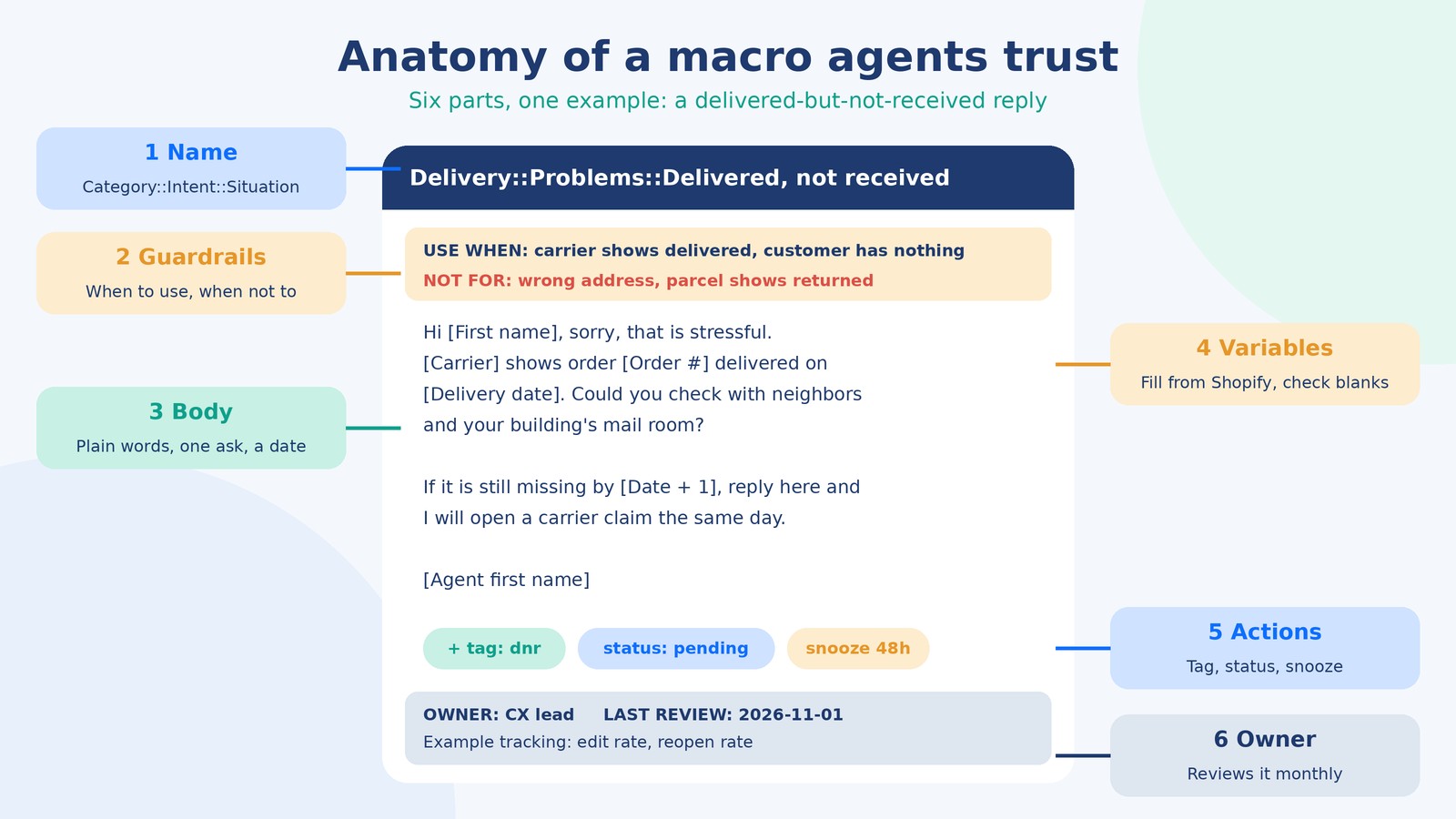
A good macro has six parts: a clear name, guardrails for when to use it, a short body, variables with fallbacks, actions, and an owner who reviews it. Most template lists online give you only the body. The other five parts are what stop a team of ten from sending ten different versions of the same answer.
- Name. Category::Intent::Situation, written as the answer, not the question. “Delivery::Problems::Delayed, new date known” beats “Late order”.
- Guardrails. One line on when to use it and one on when not to. Put it in the macro description or as an internal note at the top that agents delete.
- Body. Plain words, one ask, and a date or next step. If the customer has to write back to find out what happens next, the macro is not finished.
- Variables. Customer name, order number, product, dates. Each one needs a fallback (see the table further down).
- Actions. Tag for reporting, status (pending if you expect a reply, solved if not), and a snooze or follow-up for anything you promised to check.
- Owner and review date. Policies change. Someone has to notice when the return window moves from 30 to 45 days.
How do you name and organize macros so agents find them?
Use the same category structure as your ticket tags, with two or three levels, and keep five to ten macros in each final folder. In Zendesk, putting two colons in a macro title creates nested categories automatically, so “Returns::Refunds::Refund issued” shows up under Returns, then Refunds, in the agent’s menu (Zendesk: organizing macros). In a helpdesk without nested folders, the same convention still pays off, because agents find macros by typing part of the name.
A few rules we hold every team to:
- Start with the stage of the order, not the department. Customers think “my parcel is late”, not “logistics query”.
- Name the situation that makes the macro different. “Too late to cancel” and “Cancelled and refunded” are two macros, not one with a note.
- Mark channel versions in brackets: “(chat)” or “(email)”. Gorgias’s own chat templates drop the greeting and sign-off and keep sentences short, which is right; an email-length reply in a chat window reads like a wall.
- Prefix internal-only macros with “Internal::” so no one sends a warehouse escalation to a customer.
What macros should an ecommerce support team copy first?
These 24 cover the bulk of a typical Shopify inbox. Change the wording to match your brand, swap in your own policy numbers, and map the bracketed fields to your helpdesk’s variables. Each one lists when to use it and the actions it should apply.
Order status
1. Orders::Status::Shipped, on time
Use when: tracking shows movement and the expected date has not passed.
Hi [First name], good news: order [Order #] left our warehouse on [Ship date] with [Carrier] and is due by [Delivery date]. You can follow it here: [Tracking link]. If it is not with you by then, reply here and I will chase it.
Actions: tag wismo_shipped, status solved.
2. Orders::Status::Not shipped, within window
Use when: order is paid and still inside your stated dispatch time.
Hi [First name], your order [Order #] is confirmed and being packed. It will ship by [Dispatch date], and the tracking link will come to this email the moment it does.
Actions: tag wismo_unshipped, status solved.
3. Orders::Status::Not shipped, late
Use when: your dispatch promise has passed. Check the warehouse before sending.
Hi [First name], I am sorry, order [Order #] has not shipped yet and that is on us. [Reason in one sentence]. It will leave by [New date]. If you would rather not wait, reply “cancel” and I will refund you in full today.
Actions: tag dispatch_late, status pending, snooze to the new date.
4. Orders::Status::Pre-order
Use when: the order contains a pre-order or backordered item.
Hi [First name], [Product] is on pre-order and we expect it in stock on [Date]. Your order ships as soon as it arrives. Anything else on the order will [ship with it / ship separately now].
Actions: tag preorder, status solved.
5. Orders::Status::No order found
Use when: you cannot match the email to an order.
Hi [First name], I could not find an order under this email address. Could you send the order number from your confirmation email, or the email you used at checkout? I will look it up straight away.
Actions: tag order_not_found, status pending.
Order changes and cancellations
6. Orders::Changes::Address updated
Use when: you changed the address before fulfillment.
Done, [First name]. Order [Order #] will now ship to [New address]. Nothing else changes on your order.
Actions: tag address_change, status solved. In Gorgias, attach the Shopify edit-address action.
7. Orders::Changes::Too late to change address
Use when: the order has shipped.
Hi [First name], order [Order #] shipped this morning, so we can no longer change the address. You may be able to redirect it with [Carrier] here: [Carrier link]. If it comes back to us, I will reship it to the right address.
Actions: tag address_change_late, status solved.
8. Orders::Cancel::Cancelled and refunded
Use when: you cancelled before fulfillment.
Hi [First name], order [Order #] is cancelled and [Amount] is on its way back to your original payment method. Most banks show it within [X] business days.
Actions: tag cancelled, status solved, Shopify cancel action if your helpdesk supports it.
9. Orders::Cancel::Too late to cancel
Use when: the order has shipped.
Hi [First name], your order has already left us, so I cannot cancel it now. Once it arrives, you can send it back within [X] days for a full refund: [Returns link].
Actions: tag cancel_late, status solved.
Delivery problems
10. Delivery::Problems::Stuck scan
Use when: tracking has not updated for 3 or more business days.
Hi [First name], I can see order [Order #] has not had a tracking update since [Date] in [Location]. Parcels sometimes go quiet between depots, but I have asked [Carrier] to check. I will update you by [Date + 2].
Actions: tag stuck_scan, status pending, snooze 2 days.
11. Delivery::Problems::Delayed, new date known
Use when: the carrier or warehouse has given a new date.
Hi [First name], I am sorry, order [Order #] is running late. [Carrier] now expects to deliver it by [New date]: [Tracking link]. If it is not with you by then, reply here and I will send a replacement or refund, your choice.
Actions: tag delayed, status pending, snooze to the new date.
12. Delivery::Problems::Delivered, not received
Use when: carrier shows delivered and the customer has nothing.
Hi [First name], sorry, that is stressful. [Carrier] shows order [Order #] delivered on [Delivery date]. Could you check with neighbors and your building’s mail room? If it is still missing by [Date + 1], reply here and I will open a carrier claim the same day.
Actions: tag dnr, status pending, snooze 48 hours.
13. Delivery::Problems::Returned to sender
Use when: tracking shows the parcel coming back to you.
Hi [First name], [Carrier] could not deliver order [Order #] and is sending it back to us. Could you confirm the full address, including apartment number? I will reship it as soon as it lands, or refund you if you prefer.
Actions: tag rts, status pending.
Damaged, wrong or missing items
14. Delivery::Damaged::Ask for photos
Use when: damage reported and your policy needs a photo first.
Hi [First name], I am sorry it arrived like that. Could you send a photo of the item and one of the outer box, including the shipping label? As soon as I see them, I will send a replacement or refund, whichever you prefer.
Actions: tag damaged, status pending.
15. Delivery::Damaged::Replacement sent
Use when: photos received and a replacement is created.
Thanks for the photos, [First name]. A new [Product] is on its way under order [Replacement #], and you do not need to send the damaged one back. Tracking: [Tracking link].
Actions: tag damaged_replaced, status pending, snooze until delivery.
16. Delivery::Wrong item::Our mistake
Use when: you shipped the wrong product or variant.
That is our mistake, [First name], and I am sorry. The right [Product] ships today, and here is a prepaid label for the one you received: [Label link]. No need to wait for it to reach us.
Actions: tag wrong_item, internal note to warehouse, status pending.
17. Delivery::Missing item::Split shipment check
Use when: one item is missing from a multi-item order.
Hi [First name], your order shipped in [two] parcels. The [Product] is in the second one: [Tracking link]. If both have arrived and it is still missing, reply here and I will send it again.
Actions: tag missing_item, status pending.
Returns and refunds
18. Returns::Policy::How to return
Use when: customer asks how to send something back, within the window.
Hi [First name], you can return items within [X] days of delivery. Start here and you will get a label straight away: [Returns link]. Refunds go out within [X] days of the parcel reaching us.
Actions: tag return_info, status solved.
19. Returns::Policy::Outside window
Use when: return requested after your window closed.
Hi [First name], order [Order #] is outside our [X]-day return window, so I cannot refund it. What I can do is offer [store credit / exchange] for [Amount]. Would that help?
Actions: tag return_outside_window, status pending.
20. Returns::Exchange::Size swap
Use when: customer wants a different size or color.
Happy to swap that, [First name]. Which size would you like? If it is in stock, I will send it as soon as your return is scanned by the carrier, so you are not waiting on our warehouse.
Actions: tag exchange, status pending.
21. Returns::Refunds::Refund issued
Use when: you processed the refund.
Hi [First name], your refund of [Amount] was issued today to your original payment method. Banks usually show it within [X] business days. Reference: [Refund ID].
Actions: tag refund_issued, status solved.
22. Returns::Refunds::Refund not showing
Use when: customer says money has not arrived after your stated time.
Hi [First name], the refund of [Amount] left us on [Date]. If your bank still does not show it, they can trace it with this reference: [Refund ID]. I am happy to send a confirmation for them too.
Actions: tag refund_chase, status pending.
Internal escalations
23. Internal::Escalate::Warehouse
Use when: order needs a warehouse check: wrong item, missing item, address stop.
INTERNAL: Order [Order #]. Issue: [one line]. What I need: [check / stop / reship]. Customer promised an update by [Date].
Actions: private note, tag esc_warehouse, assign to warehouse group.
24. Internal::Escalate::Team lead
Use when: refund above agent limit, chargeback threat, legal or safety issue.
INTERNAL: Ticket needs a lead. Reason: [refund over limit / chargeback / safety]. Amount: [Amount]. What I have already offered: [offer].
Actions: private note, tag esc_lead, priority high, assign to leads.
Chargeback threats need a careful, documented reply rather than a template. Our guide to chargeback management for D2C brands covers what evidence to collect before a dispute lands.
How do macro variables work, and what happens when one is blank?
Variables pull customer and order data into the reply when the macro is applied. If the data is missing, both Gorgias and Zendesk drop in a blank, so the reply can go out with a gap where a name or date should be. Gorgias says so plainly in its macro variables guide, and Zendesk’s placeholder documentation says the same.
The most common cause is simple: a customer writes in from a different email than the one on their Shopify account, so the helpdesk cannot match an order. The macro still fires, and the customer gets “Your order shipped on with .”
| Placeholder in this article | Gorgias variable | Zendesk placeholder | Fallback if blank |
|---|---|---|---|
| [First name] | {{ticket.customer.firstname}} |
{{ticket.requester.first_name}} |
“Hi there,” |
| [Order #] | {{ticket.customer.integrations.shopify.orders[0].id}} (last order) |
A custom ticket field filled by your Shopify integration | Ask for the order number before sending |
| [Product] | {{ticket.customer.integrations.shopify.orders[0].line_items[0].name}} |
Custom field or typed by the agent | “your order” |
| [Agent first name] | Current agent variable from the macro editor | {{current_user.first_name}} |
Team signature |
| [Tracking link], [Date] | Paste from the order sidebar if no variable exists | Paste from the integration panel | Never send with this blank |
Our rule for agents: read the rendered reply once before sending, every time. It takes five seconds and it catches blanks, the wrong order (variables usually point at the last order, not the one the customer is asking about), and policy numbers that went stale.
How do you keep macros from sounding robotic?
Write them the way your best agent talks, keep them short, and leave room for one line that is about this customer only. Customers can tell when they are getting a template. What they mind is a template that ignores what they wrote.
- Answer first. Put the fact they asked for in the first sentence. Apologies and thanks can come second.
- One personal line. If they mentioned a birthday gift or a trip, the agent adds one sentence about it. That line does more for CSAT than any wording change.
- Cut filler. “We sincerely apologize for any inconvenience this may have caused” says nothing. “Sorry, that is on us” says it in four words.
- Give a date. “Soon” and “shortly” create follow-up tickets. “By Thursday” does not.
- Match the channel. Chat versions lose the greeting and signature. SMS versions lose almost everything except the answer and the link.
We score this in QA. If you want a way to check tone and accuracy across agents, our customer service QA scorecard has a template with weights.
Do shipping delay macros have legal requirements?
In the US, yes. Under the FTC’s Mail, Internet, or Telephone Order Merchandise Rule, if you cannot ship within the time you promised (or within 30 days if you promised nothing), you have to offer the buyer the choice to accept the delay or cancel for a prompt refund. The rule also sets what the notice must say about a revised shipping date. The full text is at 16 CFR 435.2.
That is why macro 3 above offers a cancel option and a definite new date. A delay macro that only says “sorry, it is running late” may fall short. This is not legal advice; if pre-orders or long backorders are a big part of your business, have counsel review your delay macros once and lock the wording.
How do you measure whether your macros are working?
Track four things per macro each month: how often it is used, how often tickets reopen after it, how much agents edit it, and what tickets came in with no macro at all. Zendesk lets you sort macros by usage on its Growth and Professional plans and above; in other helpdesks, the tag each macro applies gives you the same count through your ticket reports.
Here is how a monthly audit reads for a hypothetical mid-size apparel store. The numbers are illustrative, but the patterns are the ones we see most:
| Macro | Uses (30 days) | Reopen rate | What it told us | Fix |
|---|---|---|---|---|
| Orders::Status::Shipped, on time | 410 | 4% | Working | Leave it |
| Delivery::Problems::Delayed | 160 | 21% | Customers wrote back asking “so when?” | Added a firm date field and a cancel option |
| Returns::Policy::Outside window | 45 | 30% | Felt like a flat no | Added a store-credit offer agents can use |
| Product::Sizing::Between sizes | 3 | n/a | Nobody used it | Merged into the sizing macro |
| (no macro) | 95 tickets auto-tagged discount_not_applied | n/a | A gap in the library | Wrote a new macro and fixed the code rules at checkout |
A high reopen rate means the macro did not answer the question. Heavy editing means the default wording is wrong for most cases. Zero use means it is either not needed or impossible to find. And untagged clusters are the macros you have not written yet. Reopens also feed into wider support numbers like first-contact resolution, which we break down in customer support KPIs that predict retention.
Keep the audit on the calendar. Fifteen minutes on the first Monday of the month is enough for most libraries under a hundred macros.
Do macros still matter if you use an AI agent?
Yes. Your macro library becomes the approved wording and policy that both humans and AI work from. AI tools that draft replies are only as good as the policies they read. If your return window, refund timing and delay wording live in clean, current macros and help articles, the AI drafts match them. If they live in five agents’ heads, the AI guesses.
In practice we keep humans on anything involving money, safety or an upset repeat customer, and let automation take simple status checks once the macros behind them have a low reopen rate.
Can an offshore team build and run your macro library?
Yes, and it is one of the first things a dedicated support team should own, because the people answering tickets all day see which macros fail. In our customer service management for ecommerce work, the team pulls your ticket history, writes the starter library in your brand’s voice, wires up tags and actions in Gorgias or Zendesk, and runs the monthly audit. Policy changes go through your sign-off, then into the macros the same day.
The library also becomes the backbone of training. New agents learn your policies by learning the macros, and the “use when” lines double as a decision guide. If you are setting up written processes for a remote team, our guide to ecommerce SOPs for remote teams covers the rest.
Inbox full of the same five questions? We can audit your last 60 days of tickets and show you which macros would take the most load off your team.
Book a call with AcquireX and bring your helpdesk export. We will tell you where we would start.
Frequently asked questions
What is a macro in customer service?
A macro is a saved reply that also performs actions on a ticket, such as adding tags, changing the status, assigning it or updating fields. Agents apply it in one click, so the customer gets a consistent answer and the ticket is recorded correctly.
What is the difference between a macro and a canned response?
A canned response inserts text only. A macro inserts text and changes the ticket at the same time. That is why macros are better for reporting: every use leaves a tag you can count.
How many customer service macros should an ecommerce store have?
Most Shopify stores do well starting with 20 to 25 macros built around their top ticket reasons. Add more only when the monthly audit shows a gap, and retire anything that goes unused for a couple of months.
How do I organize macros in Zendesk?
Put categories in the macro title separated by two colons, such as Returns::Refunds::Refund issued. Zendesk turns each level into a nested folder in the agent’s macro menu.
What happens if a macro variable has no data?
In both Gorgias and Zendesk, the variable is replaced with a blank. Give every variable a fallback, and have agents read the reply once before sending.
Should chat macros be different from email macros?
Yes. Chat macros should skip the greeting and sign-off and use short sentences. Keep a separate version for each channel and label it in the macro name.
How often should macros be reviewed?
Monthly is a good rhythm for most teams, plus an immediate update whenever a policy changes, such as a new return window or shipping cutoff. Give each macro an owner so the review actually happens.
Can macros replace an AI support agent?
They do different jobs. Macros give human agents fast, approved answers; AI agents answer on their own. A clean macro library makes AI replies more accurate because it gives the AI current, approved policy wording to work from.