Dead stock is inventory that has not sold for a set period, usually 90 to 180 days, and is unlikely to sell at full price. To deal with it, flag it by variant using days since last sale and weeks of cover, then clear it in order: bundle, targeted markdown, second channel, supplier return or liquidation, and finally donation or write-off. Then fix the buying decision behind it.
Key takeaways
- Define dead stock with a number, not a feeling: a sales-free window plus a weeks-of-cover ceiling, set per category.
- Run the check at the variant level every week. Products can look fine while individual sizes or colors are dead.
- Clear stock from the highest-recovery option down. Liquidation and write-offs come last, not first.
- Time matters more than price. Every month you wait adds storage cost and lowers what the stock will fetch.
- Most dead stock is a purchasing problem. Smaller first orders, honest forecasts and fewer launch variants prevent most of it.
Every brand we work with has some dead stock. A size run that never sold, a color that looked great in the sample room, a holiday bundle that arrived on December 20th. The problem is rarely that it exists. The problem is that nobody owns it, so it sits in a warehouse or an FBA center for a year, quietly costing money each month until someone writes it off in one painful adjustment.
This guide is the process our operations team uses with ecommerce clients: how to define dead stock, how to find it in your data, a worked example of what it actually costs, the order in which to clear it, and the purchasing habits that stop it from coming back.
What is dead stock, exactly?
Dead stock is inventory with no meaningful sales over your chosen window and no realistic route back to full-price selling. It is also called dead inventory or obsolete stock, and people often lump it together with slow-moving and excess stock. Those are related, but they are not the same thing, and they need different responses.
| Term | What it usually means | What to do |
|---|---|---|
| Slow-moving stock | Still selling, but well below plan; cover is stretching out | Watch weekly, stop or shrink the next reorder |
| Excess stock | More units than you can sell in a sensible window, even if the SKU sells fine | Pause buying, shift units to other channels or locations |
| Obsolete stock | No future demand at the old price: discontinued, replaced by a new version, expired, or out of season for good | Exit plan now, before the value drops further |
| Dead stock | No sales (or close to none) for your threshold period, usually 90 to 180+ days, and no realistic path to full price | Run the exit ladder and fix the buying decision that caused it |
The distinction matters because the fixes differ. Excess stock on a healthy SKU just needs you to stop buying for a while. A truly dead SKU needs an exit plan. Treating every slow item as dead leads to needless markdowns; treating dead items as merely slow leads to a year of storage fees.
How long before inventory counts as dead stock?
There is no universal rule, but most ecommerce teams use somewhere between 90 and 180 days without a sale, adjusted for how fast the category normally turns. A fashion brand with seasonal drops may call a style dead after one missed season. A spare-parts seller with steady, slow demand might reasonably hold a SKU for a year.
We set the threshold per category rather than per store, and we use two tests together:
- Days since last sale. Simple and hard to argue with. Zero sales in 90 days with stock on hand means the SKU goes on the list.
- Weeks of cover. Current units divided by average weekly units sold. A SKU that still sells one unit a month is not “zero sales”, but if you hold 300 of them, it is dead in practice.
A practical aging rule that works for most catalogs:
| Age since last sale | Status | Owner action this week |
|---|---|---|
| 0 to 90 days | Healthy | Nothing, unless cover is above 26 weeks |
| 91 to 180 days | Slow: on the watchlist | Cancel or cut open POs; test a bundle or placement change |
| 181 to 365 days | At risk | Markdown, second channel, ask the supplier about returns |
| 365+ days | Dead | Liquidate, donate or write off; record the root cause |
Seasonal items need a note in the system so they are not flagged during their off-season. Without that note, someone will mark down your winter stock in July.
How do you find dead stock in Shopify and on marketplaces?
Pull variant-level stock and unit sales for the last 90 and 180 days, calculate weeks of cover for each variant, and sort by the cost value tied up. That sorted list is your dead stock report. Do it at the variant level, because a product with five sizes can look healthy overall while three sizes have not moved in months.
In Shopify, the built-in inventory reports already include sell-through rate and days of inventory remaining, depending on your plan. Shopify defines sell-through as units sold divided by units sold plus units still in stock, which is a quick way to spot laggards. Its ABC product analysis groups products by revenue share, and Shopify itself suggests that C-grade items are where slow and dead stock usually lives. We cover the method in detail in our guide to ABC analysis for inventory.
The weekly check we run for clients looks like this:
- Export variant SKU, on-hand units by location, unit cost and units sold in the last 90 and 180 days. Include Amazon, Walmart and wholesale sales, not just the storefront.
- Calculate weekly velocity: units sold in 90 days divided by 13.
- Calculate weeks of cover: on-hand units divided by weekly velocity. Zero sales means infinite cover; flag it straight away.
- Calculate cash tied up: on-hand units times landed unit cost. Use landed cost, with freight and duties included, not the factory price.
- Sort by cash tied up, highest first, and only work the top of the list. Twenty SKUs often hold most of the problem.
- Tag a reason for each one: over-ordered, seasonal miss, unpopular variant, listing problem, damaged, discontinued.
One check before you act: make sure the units are actually there. If the system says 140 and the shelf says 12, you have a records problem, not a dead stock problem. A quick count fixes that, and our cycle counting guide shows how to build those counts into the week.
For FBA sellers, Amazon’s own inventory age data is the place to start, because Amazon charges extra for aged units. Amazon’s FBA fee overview lists an aged inventory charge on items stored in a fulfillment center for more than 181 days, plus per-item fees for removal, disposal and liquidation orders. Amazon has also announced that from February 1, 2027 it will fold the aged inventory surcharge into a single age-based storage rate, and says that change means higher fees for aged inventory. Either way, old units in FBA get more expensive the longer they sit.
What does dead stock actually cost you?
Dead stock costs you the cash you paid for it, plus storage and handling every month, plus the value it loses as it ages, plus the space and attention it takes from products that sell. The purchase price is already spent, so the real question is what each extra month of waiting costs.
Here is a worked example, with made-up but realistic numbers so you can swap in your own:
- A brand holds 600 units of a phone case color. Landed cost is $8 per unit, retail $24.
- It sold 30 units in the last 90 days, so weekly velocity is 30 ÷ 13 = about 2.3 units.
- Weeks of cover: 600 ÷ 2.3 = about 260 weeks. That is five years of stock.
- Cash tied up: 600 × $8 = $4,800.
- If the brand’s own carrying cost (storage, insurance, handling, cost of capital) works out to 20% of inventory value a year, a figure you should replace with yours, holding this stock costs about $960 a year, or $80 a month.
Now compare two choices. Hold and hope: maybe it sells at full price over five years, while costing roughly $80 a month and getting harder to sell as phone models change. Or mark it down to $14 and move 300 units in six weeks. That brings in $4,200, covers more than the full cost of the whole lot, and the remaining 300 units can go to a bundle or a liquidator. The second choice almost always wins, and it frees money to reorder a product that actually turns.
Two numbers make this visible to the whole team: inventory turnover ratio, which falls as dead stock piles up, and contribution margin per order, which tells you whether a markdown still leaves you money after fees and shipping.
How do you get rid of dead stock without wrecking your margins?
Work down an exit ladder: try the options that keep the most value first, and move down only when a rung fails or a deadline arrives. Give each rung a time limit, usually two to four weeks, so stock does not stall on one option for months.
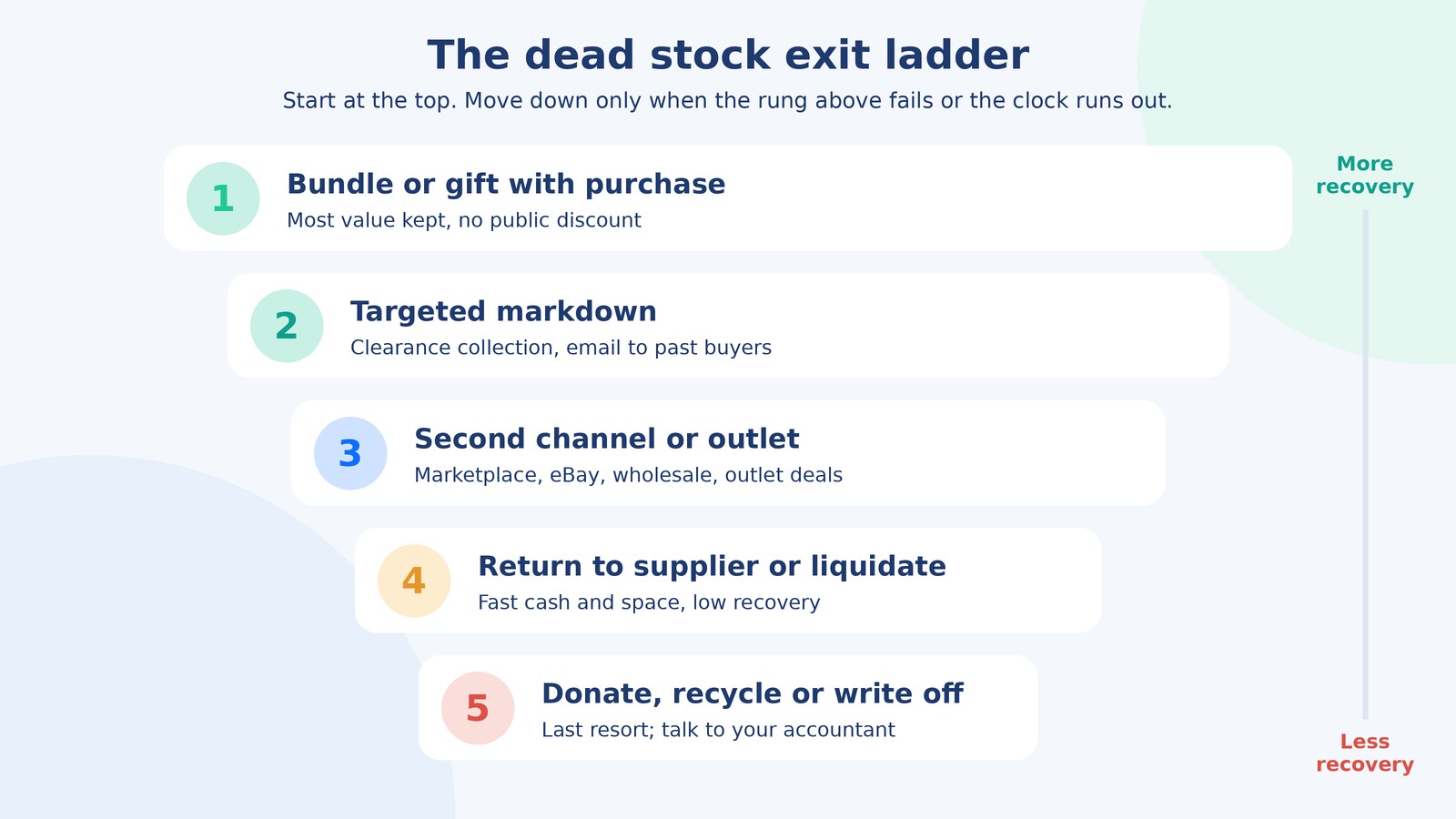
| Option | What you typically recover | Speed | Best when | Watch out for |
|---|---|---|---|---|
| Bundle or gift with purchase | Most of the value; the bestseller carries the sale | Medium | The item still has some appeal and pairs naturally with a top seller | Bundles that confuse inventory sync or hide the dead SKU’s true cost |
| Targeted markdown | Some margin, sometimes break-even | Fast if the price is right | Demand exists at a lower price | Training customers to wait for sales; keep it off site-wide promos |
| Second channel or outlet | Varies by channel fees | Medium | Different buyers live on Amazon, eBay, Walmart or wholesale | Listing work and channel fees eating the recovery |
| Return to supplier | Often a credit, minus a restocking fee | Slow to negotiate | You have a good relationship or the terms allow it | Freight back can cost more than the credit |
| Liquidation | Low; usually a small fraction of the item’s value | Fast | You need the space and cash more than the margin | Brand risk if goods show up cheap on your own channels |
| Donate, recycle or write off | Possible tax benefit, no cash | Fast | Goods have no resale value, or holding them costs more than they are worth | Tax rules vary; confirm with your accountant first |
1. Bundle it with something that sells
Pair the dead item with a bestseller as a gift with purchase or a value bundle. You are not discounting the hero product, so its pricing stays clean, and the dead item adds perceived value. This works best when the pairing makes sense: a cleaning kit with a jacket, a strap with a watch. Our post on Shopify bundles that raise average order value covers the setups. Map bundle components properly in your inventory system, or you will oversell the bestseller.
2. Run a targeted markdown
Put the dead SKUs in a clearance collection, email past buyers of related products, and keep the discount off your site-wide promotions. A short window of a few days creates urgency without training your whole list to wait. Set a floor price first: the lowest price that still covers payment fees and shipping on a single order.
3. Move it to a second channel
Stock that is dead on your storefront is sometimes just unseen. Marketplaces, eBay, Walmart, wholesale buyers or an outlet deal reach different shoppers. The catch is the listing work and channel fees, so do it for SKUs with enough units to justify the effort. For Amazon stock, also ask whether a slow SKU belongs in FBA at all, or would be cheaper to fulfill yourself.
4. Return it to the supplier or liquidate
Ask the supplier first. Many will accept returns for credit against the next order, especially if the relationship is good, though a restocking fee is common. If that fails, liquidation gives fast cash and space at a low price. Amazon’s FBA Liquidations program is one route for stock already in Amazon warehouses, but expect a small fraction of the item’s value back. Before selling to a liquidator, ask where the goods will be resold; your own product showing up at a deep discount on the same marketplace hurts the full-price listing.
5. Donate, recycle or write it off
When nothing else works, donating usable goods clears space and helps someone. Tax treatment depends on your business structure and where you operate; the IRS’s page on charitable contribution deductions is the starting point in the US, but talk to your accountant before you count on any benefit. Damaged or expired goods get recycled or disposed of, and the write-off goes through your books properly so your inventory value matches reality.
Why does dead stock happen in the first place?
Most dead stock comes from buying decisions, not bad luck: ordering too much too early, forecasting from a spike, or launching too many variants. When you tag a reason for every dead SKU, the same few causes show up again and again.
| Root cause | What it looks like in the data | Fix that stops it next time |
|---|---|---|
| Over-ordering to hit a supplier MOQ or price break | Large first PO, cover above 52 weeks within two months | Negotiate a smaller first order or split deliveries |
| Forecasting from a promo spike | Reorder sized on a launch week or a BFCM peak | Forecast from baseline weeks; treat promos separately |
| Too many variants | Two sizes or colors sell, the rest sit | Launch fewer variants; add the rest once sizes prove out |
| Seasonal miss | Stock lands after the season peak | Work back from the sell-by date using supplier lead time |
| Listing problem, not a demand problem | Item has views but no add-to-carts, or no views at all | Fix photos, title, price or search visibility before marking down |
| Stock in the wrong place | Units sit at one warehouse while another location stocks out | Rebalance across locations before buying more |
| Phantom stock | System shows units the shelf does not have | Cycle count the SKU before deciding anything |
Supplier minimums are behind a lot of this. A factory needs 1,000 units, the brand needs 300, and the extra 700 become next year’s clearance problem. Our guide to minimum order quantity covers ways to negotiate MOQs down or split them across colors and deliveries.
How do you stop dead stock from coming back?
Make every purchase order pass a cover check, buy small for anything unproven, and review the dead stock list on a fixed schedule with one named owner. Prevention is cheaper than any rung on the exit ladder.
- Cap cover on every PO. Before a purchase order goes out, calculate how many weeks of cover it creates at current velocity. If it pushes a SKU past your ceiling (for example 26 weeks), it needs a written reason and sign-off.
- Test before you scale. Order a small first batch of new products, even at a higher unit cost, and reorder once you see real sell-through. The higher unit price is cheaper than 600 unsold units.
- Forecast from baseline weeks. Strip out launch spikes, promotions and one-off press before you size a reorder. Our demand forecasting and safety stock guide walks through the method.
- Launch fewer variants. Start with the sizes and colors you are most confident in, then extend the range.
- Set an end date for seasonal stock. Every seasonal SKU gets a planned clearance date when it is bought, not when it is already late.
- Use first-in, first-out. Ship older units first so stock does not age on the back shelf while new receipts go out the front.
- Review weekly, decide monthly. A short weekly look at the aging report, and a monthly meeting where each at-risk SKU gets a decision and a date.
The last point is where most brands slip. Dead stock grows in the gap between the person who buys stock and the person who sells it. Someone has to own the list.
Who should own dead stock in a small ecommerce team?
One person should own the aging report and the decisions, usually whoever owns inventory planning, with marketing and finance consulted on markdowns and write-offs. Without a single owner, everyone assumes someone else is dealing with it.
In practice, that owner needs a few hours a week: pulling the report, chasing suppliers about returns, setting up bundles, listing SKUs on a second channel and logging the reasons. That is exactly the kind of steady operations work that falls through the cracks when founders do it alongside everything else.
Want someone to own your inventory health?
AcquireX’s supply chain management services give ecommerce brands a dedicated team that runs the weekly aging report, flags slow SKUs before they die, works the exit ladder across your store and marketplaces, puts a cover check on every purchase order and keeps demand plans tied to real sell-through. You get a clear monthly view of cash tied up in stock and what is being done about it.
Book a call with AcquireX and we will walk through your current inventory and show you where the dead stock is hiding.
Frequently asked questions
What is dead stock in ecommerce?
Dead stock is inventory that has not sold for a set period, commonly 90 to 180 days or more, and is unlikely to sell at full price. It ties up cash and storage space and usually needs an active plan to clear.
What is the difference between dead stock and slow-moving stock?
Slow-moving stock still sells, just below plan. Dead stock has stopped selling, or sells so rarely that the units on hand would take years to clear. Slow stock needs a smaller reorder; dead stock needs an exit plan.
How do you calculate weeks of cover?
Divide current units on hand by average weekly units sold. For example, 600 units with 2.3 units sold per week gives about 260 weeks of cover. Use 90 days of sales divided by 13 for the weekly figure.
Is it better to discount dead stock or hold it?
Usually discount it. Holding stock costs storage and handling every month, and products lose value as they age. A markdown that recovers your landed cost is often better than waiting a year for a full-price sale that may never come.
Can I return dead stock to my supplier?
Sometimes. Some suppliers accept returns for credit, often with a restocking fee, especially for a good long-term customer. Ask before you liquidate, and check that return freight does not cost more than the credit.
What happens to dead stock in Amazon FBA?
Amazon charges an aged inventory fee on units stored more than 181 days, on top of regular storage fees. Sellers can sell through, create removal or disposal orders, or use FBA Liquidations. Amazon has said it will fold the aged surcharge into a single age-based storage rate from February 1, 2027.
Can you donate dead stock for a tax deduction?
Possibly, depending on your business structure and country. In the US, the IRS publishes guidance on charitable contribution deductions, but the rules for donated inventory are specific, so check with your accountant before claiming anything.
How often should you review dead stock?
Look at the aging report weekly and make clearance decisions monthly. Weekly checks catch slow SKUs while you still have options; monthly decisions give each exit step enough time to work.