Amazon stranded inventory is FBA stock sitting in a fulfillment center with no active offer, so nobody can buy it. To fix it, open the Fix Stranded Inventory page, read each SKU’s stranded reason, and take the matching action: relist, edit the price, change the listing back to FBA, recreate it, or remove the units. Check the auto-removal date first.
Key takeaways
- Stranded units still pay storage, they cannot sell, and each one has an automatic removal date. Work the page by that date, not by SKU.
- Most strandings are listing problems, not inventory problems. A closed offer, a blank price or an FBM switch accounts for most of what we fix.
- Never delete a listing that still has FBA units behind it. Close it instead. Deleted listings get the shortest removal window.
- If you have never set your stranded removal settings, the default is disposal when the maximum window runs out. Set them, and check the separate return address.
- Strandings repeat because of process gaps: bulk uploads, repricer rules, and people switching fulfillment channels. Fix the process and the page stays short.
What does stranded inventory mean on Amazon?
Stranded inventory means Amazon is holding your units, but there is no live, buyable offer connected to them. The stock itself is usually fine. The link between the units and a sellable listing is broken, so the product page shows no Add to Cart for that inventory, and sales stop.
Amazon’s own seller team describes it in plain terms in a Seller Forums post on inactive FBA inventory: it is inventory stored at fulfillment centers that doesn’t have an associated active offer, and it usually comes from listing issues rather than problems with the inventory. That matters for how you react. The fix is normally an edit in Seller Central, not a shipment.
The trap is that stranded looks a lot like other statuses. Before you touch anything, confirm which one you are dealing with:
| Status | What the shopper sees | Where you fix it | Clock running? |
|---|---|---|---|
| Stranded | Nothing they can buy. The units are in a fulfillment center with no active offer. | Fix Stranded Inventory (newer Seller Central: Supply chain > Manage stranded inventory) | Yes. Storage fees, plus an automatic removal date |
| Search suppressed | The page may load from a direct link, but it does not show in search | Fix Your Products / the listing itself | Yes. Amazon also counts suppressed FBA stock as stranded |
| Inactive (FBM or no stock) | No offer, because you have nothing to ship | Manage All Inventory | No FBA units involved, so no removal clock |
| Reserved | Units are briefly held for an order, a transfer or processing | Nothing to fix | No. Reserved units go back to available on their own |
| Unfulfillable | Units are damaged, expired or customer-damaged | Removal order or liquidation | Yes. These need removing too |
If the listing exists but is hidden from search, read our guide to fixing suppressed Amazon listings first. The fixes overlap, but suppression starts on a different page.
Where do you find stranded inventory in Seller Central?
Go to the Fix Stranded Inventory page. In older menus it sits under Inventory > Manage FBA Inventory; in the newer Seller Central navigation it is listed as Manage stranded inventory under Supply chain. Amazon also tells you by email and in the notifications on your inventory dashboard.
Three columns do most of the work on that page:
- Stranded reason. This is the diagnosis. The fix depends entirely on it.
- Date of stranded event. When the clock started.
- Auto-removal date. When Amazon will act on its own if you do not.
Trust this page over Manage All Inventory. We have seen SKUs that looked active in the main inventory view while still showing as stranded here, and the stranded page was the one that matched what shoppers saw. The other quick check is the product page itself: open it in a logged-out browser and see whether your offer is there.
For more than a handful of SKUs, download the stranded inventory report instead of clicking row by row. A spreadsheet lets you sort by removal date, group by reason, and hand a clean list to whoever is doing the fixes.
Why does inventory get stranded?
Inventory gets stranded when something changes on the listing side while the units are already in Amazon’s warehouse. The offer gets closed, a price goes missing, the fulfillment channel flips to merchant-fulfilled, the SKU no longer matches, or Amazon restricts the ASIN.
In the accounts we manage, the causes come in a fairly predictable order:
- Someone closed or switched the listing. A SKU went out of stock, someone flipped it to FBM to keep it alive, and nobody flipped it back when the FBA shipment landed.
- A flat file or feed overwrote something. A bulk price update with an empty cell, a template with the wrong fulfillment channel, or a variation rebuild that changed SKUs. Our guide to Amazon parent-child listings covers how variation edits can break child SKUs.
- A repricer pushed the price out of range. Amazon flags it as a potential pricing error and the offer goes inactive.
- Compliance or approval. The category started asking for documents, or the brand needs approval you do not have yet.
- Product problems. Expired dates, a discontinued item or a recall. These are the only group where relisting is not the answer.
How do you fix each stranded reason?
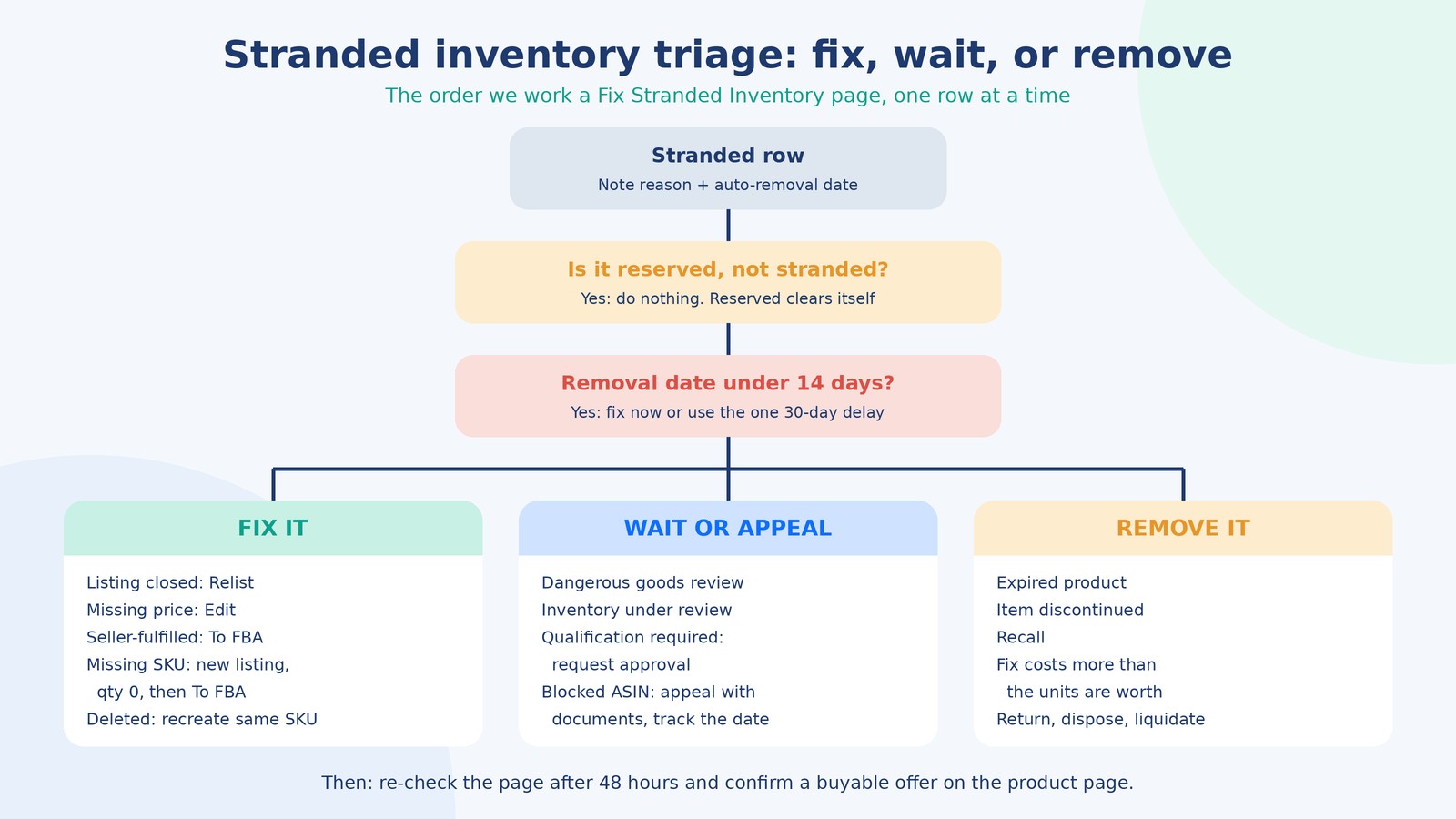
Match the action to the reason shown in the Stranded reason column. Listing problems get fixed in place; approval problems get a request or an appeal; product problems get a removal order. Amazon’s help page notes that updates can take up to 48 hours to show, so do not redo a fix after an hour because the page has not refreshed.
| Stranded reason | What usually happened | The fix | Watch out for |
|---|---|---|---|
| Listing closed | Someone closed the offer, or its end date passed | Relist from the action menu, then Save and finish | Closed on purpose? Opt the SKU out of automatic relist, or it may come back |
| Missing price | A bulk upload or repricer left the price blank | Edit and add a price | Check your repricer’s min/max so it does not wipe it again |
| Potential pricing error | Price sits far above or below what Amazon expects | Update the price inside the allowed range | A min price set too high in a repricer is a common cause |
| Seller-fulfilled | The SKU was switched to FBM, often during a stockout | Change to FBA | Agree in your SOP who is allowed to switch fulfillment channels |
| Missing SKU | FBA units have no matching SKU in Manage Inventory | Create a listing for that exact SKU (price set, quantity 0, ship myself), save, then Change to FBA | Use the same SKU so the FNSKU labels on the units still match |
| Deleted listing | The listing was deleted while units were still in the warehouse | Recreate it with the same SKU | This reason has the shortest removal window. Move fast |
| Future sell date | Offer start date is set in the future | Edit the start date | Usually a launch date typed wrong in a flat file |
| Search suppressed / listing error | Missing image, attribute or compliance field | Fix the listing data, as in a normal suppression | Same root causes as our suppressed listings guide below |
| Qualification required | Brand, category or ASIN approval is missing | Request approval from the edit page if offered | If no approval path exists, plan a removal |
| Blocked or restricted ASIN | IP, safety or quality restriction | Appeal with documents, or remove and delete | Do not recreate the same listing to get around it |
| Expired, discontinued or recalled | The product cannot be sold as it is | Create a removal order | Check for lost or damaged units you can claim first |
| Under review (dangerous goods, inventory) | Amazon is checking the item | Wait, upload anything requested | Track it. Reviews that drag on still cost storage |
Two details save the most rework.
Keep the original SKU. Amazon ties units to a listing through the SKU and its FNSKU label. If you recreate a deleted listing under a new SKU, the units already in the warehouse no longer match, and you can end up paying to relabel stock you could have sold as it was. Recreate with the exact same SKU, and confirm the ASIN matches.
Find out why it was removed before you relist. An accidental close is a two-minute fix. A listing pulled for an IP complaint or a policy reason will just get pulled again, and repeated attempts make the account look worse, not better. If you are already dealing with a policy notice, our marketplace account suspension recovery guide covers how to respond.
How long until Amazon removes stranded inventory?
Between 30 and 180 days from the stranded event, depending on the reason. If you never set your removal settings, Amazon disposes of the units when the maximum runs out. That default is the line in this whole topic that costs sellers real money.
Amazon’s stranded inventory help pages sit behind the Seller Central login, so check the live version in your account. As of November 2026, the windows were these, as reproduced in Your eCom Team’s stranded inventory guide, which quotes Amazon’s required removals page:
| Reason group | Recommended days | Maximum days before required removal |
|---|---|---|
| Closed or merchant-fulfilled units | 90 | 180 |
| Policy violations and restrictions | 30 | 60 |
| Account issue | 45 | 60 |
| Deleted listing | 14 | 30 |
| Severe policy violations and restrictions | 7 | 30 |
What we take from that table:
- Close, don’t delete. A closed listing can sit for months while you decide. A deleted one gives you about a month.
- Set your removal settings today. On the stranded page, open the automatic action settings and choose return or disposal for each reason group. If you choose return, check the address. Amazon keeps a separate return address for stranded removals, and updating your other removal address does not change it. Sellers in more than one Amazon store have to set this in each one.
- Use the delay sparingly. The action menu offers Delay removal 30 days. Amazon’s own removal notices point sellers to it when they need time to appeal or fix an issue (you can see the wording in this Seller Forums thread quoting the notice). Treat it as a one-time extension for a live appeal, not a snooze button.
Amazon also offers automatic actions for some reasons, such as relisting closed listings and switching merchant-fulfilled SKUs back to FBA after a set number of days. They help, but they also relist things you closed on purpose. Look at what is switched on and opt out the SKUs you really did mean to retire.
Should you fix, remove or liquidate stranded units?
Fix it if the product is sellable and the cause is a listing issue. Remove or liquidate when the fix would cost more than the units can earn, or the product simply cannot be sold on Amazon. Most of the time the answer is obvious. It is the slow movers and the restricted ASINs where people stall, and stalling is the expensive choice.
| Option | Cost you take on | When it wins |
|---|---|---|
| Fix and relist | Your team’s time; maybe a relabel if SKUs no longer match | Almost always, when the product is sellable and the reason is a listing problem |
| Delay removal 30 days | Another month of storage | An appeal or approval is in progress and has a real chance |
| Return to you or a 3PL | Removal fee per unit, inbound freight to your warehouse | The product sells well on another channel or can be fixed and sent back in |
| Liquidate (FBA Liquidations) | You recover a small share of value | Units are sellable but you are done with them on Amazon |
| Dispose | Disposal fee, and the units are gone | Expired, recalled or not worth shipping |
A worked example. Say a brand has 400 units of a $28 candle stranded because a teammate switched the SKU to FBM during a stockout in September. Each unit takes 0.06 cubic feet, so the lot is 24 cubic feet. Using the 2026 US Q4 standard-size storage rate of $2.40 per cubic foot that fee summaries such as this FBA fees breakdown list (check your own fee page), storage is about $58 a month. That is not what hurts. If the candle normally sells eight a day, every stranded day is roughly $224 of revenue that did not happen, in the busiest weeks of the year.
The fix is one click, Change to FBA, and a 48-hour wait. The lesson is that for anything with real sell-through, the cost of stranded inventory is the lost sales, and the work is worth doing the same day you see it.
Now flip it. 150 units of a discontinued phone case that sold twice last month, stranded as Item discontinued. There is nothing to fix. Compare the per-unit removal fee to what you can realistically get for the cases on another channel, then return or liquidate them, and pull them before the next aged-inventory snapshot so they do not pick up surcharges too. If old stock is piling up across your catalog, our guide to clearing dead stock walks through the exit options in order.
How do you fix stranded inventory in bulk?
Download the stranded inventory report, group rows by reason, and fix each group in one pass, using flat files for price and fulfillment-channel changes. Clicking through 80 rows one at a time is where mistakes come from.
The routine our team runs on larger catalogs:
- Export and sort by auto-removal date. Anything due within 14 days gets handled first, whatever the reason.
- Group by reason. All Seller-fulfilled rows go into one inventory file with the fulfillment channel set back to Amazon. All Missing price rows go into one price file. Closed listings get relisted in a batch from the page.
- Separate the judgment calls. Restricted ASINs, qualification requests and anything with a compliance flag go to one person with a deadline, because they need documents, not clicks.
- Log what you did. SKU, reason, action, date, who did it. If something fails, you will need this for a Seller Support case.
- Recheck after 48 hours. Confirm each SKU dropped off the stranded page and has a buyable offer on the product page.
When a fix will not stick after 48 hours, open a Seller Support case with the SKU, ASIN, FNSKU, the exact stranded reason text, what you changed and when. A case with all three identifiers and a timeline gets answered far faster than “my inventory is stuck.”
How do you stop inventory from getting stranded again?
Most repeat strandings come from a handful of habits: deleting instead of closing, switching fulfillment channels without a rule, uploading flat files without a check, and letting repricers run with loose limits. Fix those, and the stranded page shrinks to a weekly two-minute check.
- Put the stranded page on a weekly checklist with a named owner. Ours is Monday morning, alongside suppressed listings and the inventory health report.
- Write a rule for channel switches. If someone flips a SKU to FBM during a stockout, they log it and switch it back when the FBA shipment is received. Our FBA vs FBM guide covers when running both makes sense.
- Check flat files before upload. No blank prices, the right fulfillment channel, SKUs that match what is in the warehouse. A second pair of eyes takes five minutes.
- Do not ship more units of a stranded ASIN. Fix the listing before the next shipment goes out, or the new units join the old ones on the page.
- Keep SKUs stable across systems. If your ERP, your 3PL and Seller Central use different SKUs for the same product, strandings follow. Our guide to SKU management for multichannel sellers shows how to set up one naming scheme.
- Watch compliance requests. Category document requests often arrive weeks before a listing gets blocked. Answering them early is cheaper than an appeal later.
Stranded units also count against your Inventory Performance Index, which feeds into how much storage Amazon lets you use. A clean stranded page is part of keeping capacity for the products that do sell.
When does it make sense to hand this to a marketplace team?
When stranded rows keep coming back, or nobody on your team owns Seller Central housekeeping every week. The fixes are simple. What breaks is the routine. Strandings pile up during busy weeks, which are also the weeks they cost the most.
Our marketplace management services include this as standard work: weekly checks of the stranded and suppressed pages, flat-file reviews before upload, removal settings set up in every store, and a log of every fix so problems can be traced back to a cause. A dedicated AcquireX marketplace specialist runs it on your account, works your hours, and escalates the judgment calls (restricted ASINs, appeals, removals) to you with a recommendation rather than a question.
Got a stranded page you have been avoiding? Send us the stranded inventory report. We will sort it by removal date, tell you what can be relisted this week, and flag what should come out before more fees pile up.
Book a call with AcquireX and we will walk through it with you.
Frequently asked questions
What is stranded inventory on Amazon?
It is FBA stock in an Amazon fulfillment center that has no active offer, so customers cannot buy it. It usually comes from a listing problem, such as a closed offer, a missing price or a switch to merchant-fulfilled, not from anything wrong with the units.
Do you pay storage fees on stranded inventory?
Yes. Stranded units pay the same monthly storage fees as any other FBA inventory, and aged inventory surcharges still apply if they sit long enough. A removal order stops new storage charges on those units once it is created.
How long does it take to fix stranded inventory?
The fix itself takes minutes for most reasons. Amazon says to allow up to 48 hours for the change to show. If the SKU is still stranded after that, open a Seller Support case with the SKU, ASIN and FNSKU.
What happens if I ignore stranded inventory?
The units keep paying storage, and once the maximum window for that stranded reason passes, Amazon removes them according to your settings. If you never set those settings, the default is disposal.
Can I send more units of a stranded ASIN?
You should not. Fix the listing first. New units will land in the same stranded state, and shipments containing stranded ASINs can get flagged during shipment creation.
What is the difference between stranded and reserved inventory?
Reserved units are temporarily held for orders, transfers or processing, and they become available again on their own. Stranded units have no active offer and stay unsellable until you fix the listing or remove them. Do not create removal orders for reserved stock.
Why is my inventory stranded when the listing says active?
The offer may be suppressed, priced outside the allowed range, or set to merchant-fulfilled while the units sit in FBA. Go by the Fix Stranded Inventory page and the live product page, not by the status in Manage All Inventory.
Should I delete a listing I no longer want to sell?
Not while FBA units are still behind it. Close the listing, opt it out of automatic relist, and create a removal or liquidation order. Deleting it shortens the removal window and makes the units harder to trace.