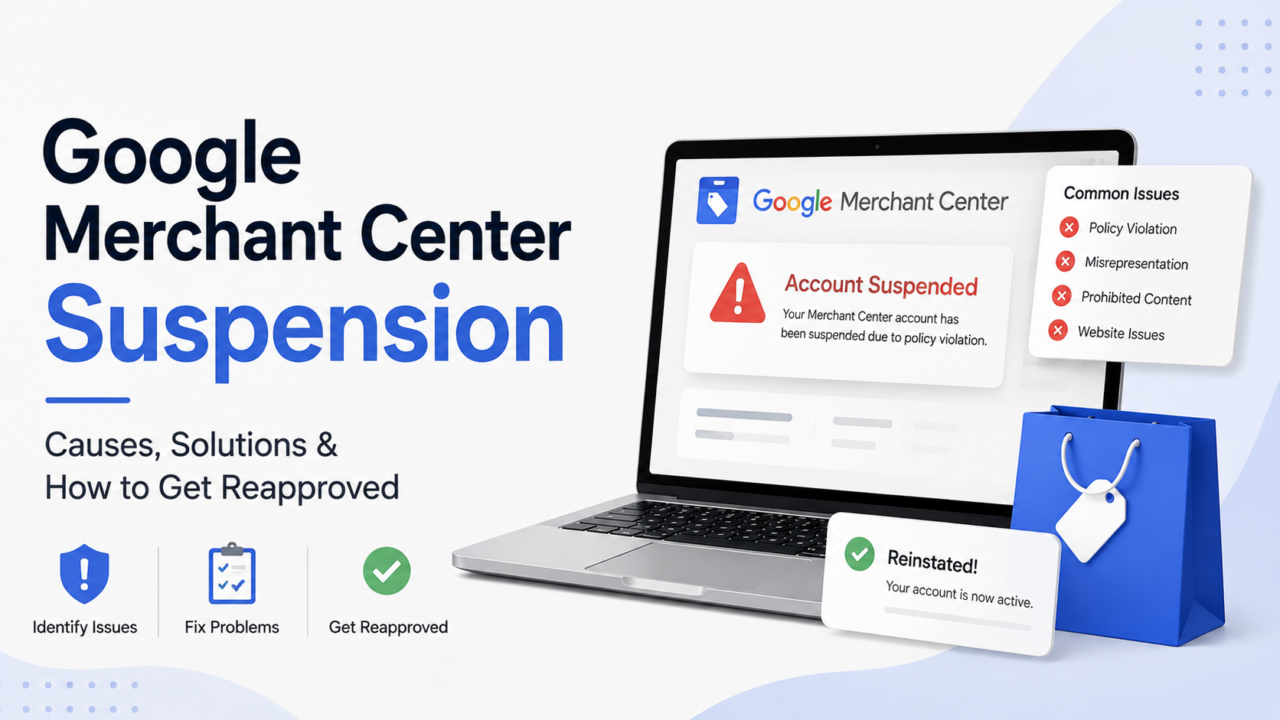
Your Shopping ads stopped. Your product listings vanished. You got a short email from Google that names a policy but not the actual problem.
That is a Google Merchant Center suspension. It hits fast. It hits without warning. And it cuts off a revenue channel the same day.
Good news: most suspensions are fixable.
Bad news: most brands appeal too early. They get denied. And they burn a review they cannot get back.
This guide shows you what sets off a suspension. It shows how to find your real cause. And it gives you the exact order to fix things before you hit “Request review.”
Quick Answer
What is a Google Merchant Center suspension? It means Google turned off your account. Your products stop showing in Shopping ads and free listings. They stay off until you fix the problem and get your account back.
What causes it most often? Misrepresentation. That is Google’s catch-all for “we do not trust this store.” It covers feed and site mismatches. It covers thin websites, missing policy pages, hidden fees, and weak trust signals.
How do you get reinstated? Fix every issue first. Build an evidence pack. Then send one clear review request. Vague appeals get denied.
How long does it take? Most first reviews come back in about 3 to 7 business days. Complex cases take longer.
Key Takeaways
- Google suspends on detection. Serious violations get no warning period
- Misrepresentation is the most common suspension type by a wide margin
- Your review requests are limited. Never appeal before the fixes are live and crawled
- The root cause is often a gap between your feed, your site, and your policies
- Prevention is an operations problem, not a marketing problem
What Does a Merchant Center Suspension Actually Mean?
There are three levels. People mix them up all the time. That mix-up costs money.
1. Product disapproval One product gets rejected. Or a small group does. The rest of your catalog keeps running. This is the mildest level.
2. Account warning Google flags an issue. You get a window to fix it. Products may still show, but with limited reach. This is your last cheap exit.
3. Account suspension Everything stops. No Shopping ads. No free listings. No product feeds inside Performance Max or dynamic remarketing. Zero revenue from the channel until you are back.
Here is the part most brands miss. Level one turns into level three if you ignore it long enough. A pile of unfixed disapprovals is one of the fastest routes to a full suspension.
For serious violations, Google skips the ladder. Its misrepresentation policy says accounts get suspended on detection, with no warning first.
Why Was My Google Merchant Center Account Suspended?
Google’s notice names a policy. It does not name the page, product, or setting behind it. Here are the causes we see most, ranked by how often they show up.
1. Misrepresentation
The biggest one by far. It is broad on purpose. Google uses it when it doubts your store.
Common triggers:
- Feed price says $29.99, product page says $34.99
- Feed says “in stock,” page says sold out
- Shipping cost in Merchant Center does not match your shipping page
- Business address in Merchant Center does not match your site footer
- Health or performance claims you cannot back up
- No clear way for a shopper to contact a real human
Google’s own policy page is blunt. It says accounts come back only in compelling cases. So being thorough and honest beats being fast.
2. Website Needs Improvement
Google is saying your site looks unfinished. Or it does not work. Check for:
- Placeholder text or stock filler copy still on live pages
- Broken links, dead pages, or 404s in your main navigation
- Checkout that fails on mobile or in a specific browser
- Pop-ups that block the cart or cannot be closed
- Missing footer links to policies
3. Hidden or Surprise Fees
This one catches good brands. The rule is simple. What the shopper pays should equal your listed price, plus your published shipping, plus tax.
Anything extra at checkout is a violation. That includes card fees, handling fees, and “insurance” toggles that default to on.
4. Counterfeit or Reseller Concerns
This is common if you resell branded goods. Google wants to know where your stock comes from. If your site does not explain that, you look like a risk.
Pricing far below MSRP makes this worse, not better.
5. Selling Services, Not Products
Merchant Center is built for products. If your listings look like consulting, memberships, or bookings, expect a flag.
Sometimes it fires by mistake on real goods with service-sounding names. Fix it. Make the physical item obvious in the title, images, and description.
6. Restricted or Sensitive Categories
Supplements, healthcare, weapon parts, and alcohol carry stricter rules. You start under closer review.
7. Feed Data Quality Problems
- Made-up or wrong GTINs
- Missing required attributes
- Variant prices that do not match the default page price
- Stale inventory data from a broken sync
If your feed hygiene is weak, our guide to Google Shopping feed optimization covers the upstream fixes. Messy identifiers across channels usually trace back to weak SKU management.
8. Google Cannot Crawl Your Site
This one blindsides people because it has nothing to do with policy.
If Google’s crawler is blocked, Google assumes you are hiding something. Common causes:
- A robots.txt rule that blocks Googlebot from product or policy pages
- A bot blocker or firewall rule added by your dev team
- Country-level IP blocks added to stop spam traffic, which also block Google
- A staging password left on part of the site
Test this before anything else. It is fast to check and fast to fix.
9. Copied Images and Descriptions
If you resell, and every image and description on your site is lifted from the manufacturer, your store looks like every other reseller. That hurts, especially when you also send no GTINs. Amazon applies a similar quality bar, which is why the same gaps often cause Amazon suppressed listings.
Shoot your own photos. Write your own copy. It helps rankings too.
10. Unlinked Badges and Awards
Trust badges help. Fake ones hurt.
If you show a Better Business Bureau seal, a Trustpilot widget, or an “As seen in” logo, link it to the page that proves it. An unlinked badge reads as an unsupported claim.
11. DMCA Complaints
If someone files a copyright complaint against your site, Google can suspend the account. These reports show up in the Lumen database.
Either remove the content or document why the claim is wrong. Expect back and forth with support on this one.
12. Restricted Health Products Without Certification
Selling drugs or supplements in the US usually means third-party certification plus a separate approval from Google. Skipping that step is an automatic problem, not a judgment call.
What Does a Suspension Actually Cost You? A Real Example
Most guides skip the math. That is a mistake. The math is what decides how fast you should staff this.
If you already track your cost per order, you can run this with your own numbers in five minutes.
Store profile:
- Monthly revenue: $420,000
- Share from Google Shopping and free listings: 22 percent
- Shopping revenue per month: $92,400
- Shopping revenue per day: $3,080
Suspension timeline:
| Phase | Days | Lost Shopping Revenue |
|---|---|---|
| Suspension to root cause found | 4 | $12,320 |
| Fixes built and deployed | 5 | $15,400 |
| Waiting on Google review | 6 | $18,480 |
| Ramp back to full delivery | 7 | $10,780 |
| Total | 22 | $56,980 |
The ramp-back line is the one people forget. Campaigns do not snap back to full spend the day you return. Learning resets. Delivery rebuilds over about a week.
Now add a failed first appeal. A rejection puts you into a cool-down period. The review button goes grey and you cannot try again until it lifts. Merchants commonly report a first cool-down of about a week, and it stretches longer with each rejection.
Seven days of cool-down, plus the time to re-audit and the second review window, easily adds 14 days. At $3,080 a day, that is another $43,120 gone.
That one number is the whole case for not rushing your appeal.
The MIRROR Framework for Reinstatement
Your feed, your site, and your settings must tell the same story. When any two disagree, Google reads it as a trust problem.
Work through these six steps in order. Do not skip to the appeal.
M: Match the feed to the page
Pull 25 random products from your feed. Open each product page in a private browser window. Compare them line by line:
- Price, including sale price and currency
- Availability
- Title and brand
- Image (does the feed image still exist on the page?)
- GTIN accuracy
- Landing page URL, with no redirect chain
Log every gap in a sheet. These gaps are your most likely root cause.
I: Inspect your policy pages
You need these live, complete, and easy to find:
- Shipping policy with real costs and real delivery windows
- Return and refund policy with a clear timeframe
- Privacy policy
- Terms of service
Each must load without JavaScript. Each must sit in your footer. And each must match what you put in Merchant Center. A returns policy that says 30 days on your site and 14 days in Merchant Center is a live violation.
R: Reveal who you are
Reviewers will search your brand name. Give them something solid.
- Physical business address, visible on the site
- Phone number that a human answers
- Support email on your domain, not a free inbox
- Contact form that works
- An About page with real people, not stock photos
- Live social profiles with matching business details
- Third-party reviews on Trustpilot or similar
Google looks past your site. Reviewers check your wider footprint before deciding.
Weak identity signals are a top reason new stores get flagged.
R: Remove risky claims
Read your product pages like a skeptical reviewer.
- Cut medical or results claims you cannot cite
- Cut fake urgency timers that reset on refresh
- Cut “was” prices that were never real prices
- Cut review counts you cannot back with real reviews
O: Open the checkout end to end
Buy something yourself. Use a real card, on a real phone, on cell data.
- Does the total match price plus published shipping plus tax?
- Does any new fee appear at the last step?
- Does the confirmation email arrive?
- Does the flow work in Safari, Chrome, and one more browser?
If a surprise fee shows up, you found a violation. Remove it. Or publish it clearly before checkout.
R: Record everything before you appeal
Almost nobody does this step. It is the one that splits approved appeals from denied ones.
Build a simple evidence pack:
- Screenshot of the original suspension notice
- Screenshot of the Account Issues page
- Your mismatch log, showing before and after
- Dates each fix went live
- Screenshots of the fixed pages
Then wait for Google to recrawl. Reviewers judge what the crawler has stored, not what your site looks like today. Appeal before the recrawl and the reviewer grades an old version of your store.
Give it a few days after your last change. Then appeal once.
How Do You Actually Request a Review?
This is where most guides get it wrong, so read this part carefully.
You do not write a long appeal letter into an open box. Google gives you two paths, and picking the wrong one can cost you your only shot.
Where to find it: Merchant Center, then Products, then the Needs attention tab, then View setup and policy issues.
You will see two options.
Option 1: “I fixed the issue” You read the policy, tick a box to confirm you understand the review process, and submit. There is no place to explain yourself. Your fixes have to speak for themselves.
Option 2: “I disagree with the issue” This path may ask for an appeal reason and supporting documents. Google’s own help pages warn that you may only get one chance to disagree. Use it only when you truly believe Google made a mistake, not as a shortcut.
Before the button will even work
Google blocks the request until you clear these:
- Identity verification is complete. This can mean government ID or business registration documents.
- Your account has at least one product in it. An empty account cannot be reviewed.
- You are not inside a cool-down period.
Some accounts also get asked for video verification. It is a gate, not a suggestion.
What if you have several issues at once?
Fix everything first. Then appeal one at a time.
Start with the most serious one. Misrepresentation outranks something like sale of services in Google’s eyes, so clear that first.
If one item is a suspension and another is only a warning, handle the warning first. It is the cheaper one to lose.
If you do get a text field
Some issue types and some accounts do show a reason field. If yours does, keep it short and factual:
Our account was suspended for Misrepresentation. We audited our feed against our live site and found 14 products where the feed price did not match the product page price, caused by a variant sync error. We corrected the feed mapping on [date] and all 14 products now match. We also added a physical business address and phone number to our footer and contact page on [date], and updated our shipping policy so the published rates match our Merchant Center shipping settings. We have reviewed our full catalog and all policy pages.
What to leave out:
- Apologies and long stories
- Blaming a developer, an app, or an agency
- Revenue impact or business hardship
- Anything you cannot prove
What If Your Appeal Gets Denied?
Do not appeal again right away. Review requests are limited. Burning through them can lock you out.
Instead:
- Wait out the cool-down. The button will be disabled. Check the Needs attention tab for the date it lifts. Do not waste the time.
- Assume you fixed a symptom, not the cause. Go back to step M. Widen the sample from 25 products to 100.
- Check your digital footprint. Search your brand name and domain. Open complaints and a wall of one-star reviews will block you. Reply to reviews in public, and keep it professional. A high dispute rate feeds the same distrust signal, which is why chargeback management and ad compliance are closer than they look.
- Check your Google Ads account too. The two are linked. If Ads went down because of the Merchant Center issue, fix Merchant Center first. If Ads went down on its own, handle that first.
- Finish any check Google asks for. Video checks or ID documents are a gate, not an option.
- Wait for a full recrawl. Then appeal once, with a stronger evidence pack.
If you face suspensions across channels, the same rules apply to marketplace account suspension recovery.
How Do You Prevent the Next Suspension?
Most brands treat this as a one-time fire. It is not. It is a monitoring gap.
Here is the routine that stops repeats.
Daily (10 minutes)
- Check the Needs attention tab for new disapprovals
- Confirm the feed pulled successfully
Weekly (45 minutes)
- Spot-check 20 random products, feed against live page
- Confirm inventory sync is accurate
- Review any new disapprovals from the week
Monthly (2 hours)
- Full checkout test on mobile and desktop
- Policy pages reviewed against Merchant Center settings
- Brand name and domain searched for new reviews or complaints
- New product launches checked for required attributes
Quarterly
- Full catalog audit
- Review restricted-category rules for anything new you sell
- Confirm every app that touches pricing or checkout is still compliant
None of this is hard. It just needs an owner. That is the real reason suspensions happen. Nobody’s job description covers it.
Write it up as an SOP for your remote team. That turns a scramble into a routine.
Who Should Own Merchant Center Compliance?
This is where most scaling brands break down.
Your media buyer watches ROAS, not feed accuracy. Your developer ships features, not policy pages. Your ops lead runs inventory, not Shopping policy.
So the feed drifts. Nobody notices. One day the channel goes dark.
This work sits between marketing, catalog, and operations. It needs one owner.
That owner should:
- Run the daily and weekly checks above
- Hold the mismatch log
- Approve any app that adds fees or changes pricing
- Sign off on new product launches before they hit the feed
For most brands doing $2M to $20M a year, this is not a full-time hire. It is a slice of a catalog or ops role, backed by a checklist. Clean catalog data upstream kills most of the risk before it ever reaches Google. Our guide to ecommerce catalog management explains how to keep that data accurate across channels.
Common Mistakes That Kill Reinstatement
- Appealing the same day you get suspended. You have not found the cause yet.
- Fixing only the flagged product. Google judges the account, not the item.
- Making changes and appealing within an hour. The crawler has not seen them.
- Hiring someone who spams review requests. This burns your reviews and can lock you out for good.
- Running two Merchant Center accounts for one store. This looks like you are dodging the rules. It makes things much worse.
- Ignoring your review profile. Reviewers search your brand. What they find matters.
- Treating your return as the finish line. With no monitoring routine, you will be back here in six months.
Frequently Asked Questions
How long does Google Merchant Center reinstatement take?
Most first reviews come back in about 3 to 7 business days. Cases with several violations take longer. You cannot speed it up. Use the wait to keep tightening your site.
Can I keep running Google Ads while suspended?
Shopping campaigns tied to the suspended account will not run. Search and Display may keep running if your Ads account is fine. But these suspensions often spread between the two. Check both.
How many times can I appeal a Merchant Center suspension?
The limit varies by account, and it is low. Practitioners commonly report a ceiling of around three, and sometimes fewer. Google’s own guidance says you may only get one chance to formally disagree with a decision. Once the option is gone, the button greys out for good. Treat every request as your last.
Does dropshipping cause Google Merchant Center suspensions?
Google does not ban dropshipping. But these stores face closer review. The space has more thin sites and shaky shipping. If you dropship, your site, policy pages, and reviews need to be stronger than average.
How long does a Merchant Center suspension last?
Indefinitely. It does not expire on its own. It lasts until you fix the cause and win a review. In some cases Google recrawls a fixed site and lifts the suspension without a request, but you cannot plan around that.
Why was I suspended without any warning?
For serious issues like misrepresentation, Google suspends on detection. It does not give a warning period first. Warnings apply to smaller problems.
Will deleting the flagged products fix it?
Usually not. Deleting hides the proof but not the cause. If the real issue is a sync error, a missing policy page, or hidden fees, the problem stays. The appeal fails.
Do I need a new website to get reinstated?
No. And building a new site on a new domain to escape a suspension can count as dodging the rules. Fix the store you have.
What to Do Next
If your account is down right now, work the MIRROR steps in order. Do not appeal until step R is done and Google has recrawled your site.
If your account is healthy, put the routine on someone’s calendar this week. A suspension costs far more than the hour a week it takes to stop one.
Most brands do not lose Shopping revenue by breaking a rule on purpose. They lose it because feed accuracy, site policies, and catalog hygiene sat between three teams and belonged to none of them.
AcquireX builds dedicated offshore teams that own that gap end to end. They cover catalog management and performance marketing as one system, not separate handoffs.
If Shopping is a channel you cannot afford to lose, talk to our team about who should own this in your business.